Participant
April 6, 2024
Answered

lightroom clasis, importo una foto y al abrirla en el modo revelar esta se oscurece

  • April 6, 2024
  • 1 reply
  • 349 views

Hola, en lightroom clasis, importo una foto a la biblioteca y al abrirla en el modo revelar esta se oscurece bastante, antes no me pasaba se veia practicamente igual en la biblioteca que en el modo revelado ¿alguien sabe a que es debido y qué puedo hacer?

This topic has been closed for replies.
Correct answer Per Berntsen
quote
Lightroom Classic, I import a photo and when I open it in Develop mode it darkens


Hello, in lightroom classic, I import a photo to the library and when I open it in the develop mode it gets quite dark, before it didn't happen to me it looked practically the same in the library as in the developed mode, does anyone know what it is due to and what can I do?


By @Chuseta


This could be caused by a setting in the camera, combined with a setting you have chosen in the import dialog.

Most cameras have a setting that brightens the shadows and mid tones. (Nikon calls it Active D-lighting)

Camera settings only affect the jpg preview that's embedded in the raw file. Unless you're using a mirrorless camera, 

LrC will ignore this setting when rendering the raw file in Develop, making the image darker than the embedded preview.


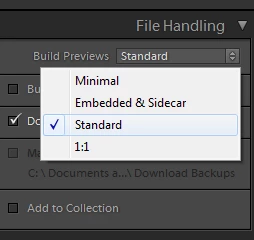
If you also used the option Embedded & Sidecar under File Handling when importing, the Library module will display the brighter embedded jpg preview instead of rendering its own preview, which would be identical to Develop.

If this is what you did, I suggest that you use any other option than Embedded & Sidecar, and let LrC render the Library preview. 


I also suggest that you turn off/neutralize all camera settings.

Alternatively, you can use a camera matching profile on import, if Adobe has created profiles for your camera.

See https://helpx.adobe.com/lightroom-classic/help/raw-defaults.html
 

1 reply

Per Berntsen
Community Expert
Per BerntsenCommunity ExpertCorrect answer
Community Expert
April 6, 2024
quote
Lightroom Classic, I import a photo and when I open it in Develop mode it darkens


Hello, in lightroom classic, I import a photo to the library and when I open it in the develop mode it gets quite dark, before it didn't happen to me it looked practically the same in the library as in the developed mode, does anyone know what it is due to and what can I do?


By @Chuseta


This could be caused by a setting in the camera, combined with a setting you have chosen in the import dialog.

Most cameras have a setting that brightens the shadows and mid tones. (Nikon calls it Active D-lighting)

Camera settings only affect the jpg preview that's embedded in the raw file. Unless you're using a mirrorless camera, 

LrC will ignore this setting when rendering the raw file in Develop, making the image darker than the embedded preview.


If you also used the option Embedded & Sidecar under File Handling when importing, the Library module will display the brighter embedded jpg preview instead of rendering its own preview, which would be identical to Develop.

If this is what you did, I suggest that you use any other option than Embedded & Sidecar, and let LrC render the Library preview. 


I also suggest that you turn off/neutralize all camera settings.

Alternatively, you can use a camera matching profile on import, if Adobe has created profiles for your camera.

See https://helpx.adobe.com/lightroom-classic/help/raw-defaults.html

 

ChusetaAuthor
Participant
April 7, 2024

Muchas gracias, prolema solucionado , tenía el D-lightng activado  y el perfil incrustado sidecar que debe instalarlo lightroom por defecto.
