masktao
Known Participant
April 1, 2023
Question

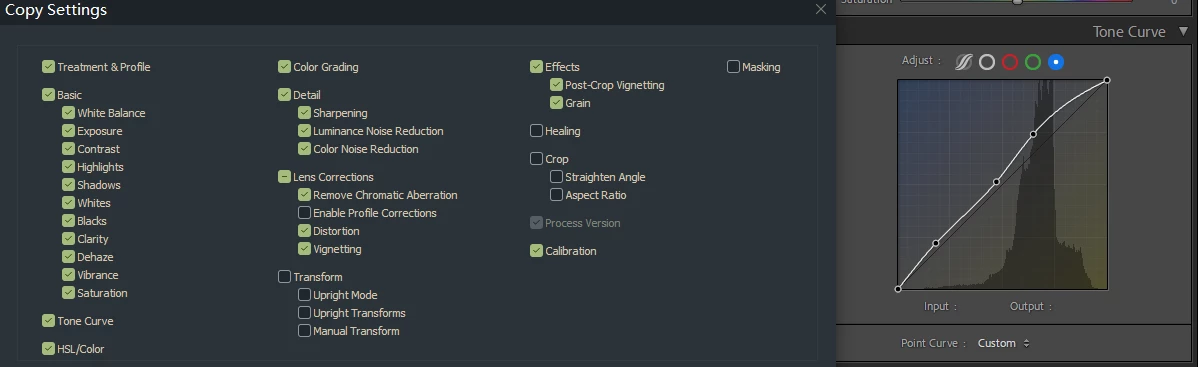
Lightroom Classic 12.2.1 copy settings, Tone curve can't copy

  • April 1, 2023
  • 4 replies
  • 1585 views

Tone curve can't copy!!!

copy setting and after paste
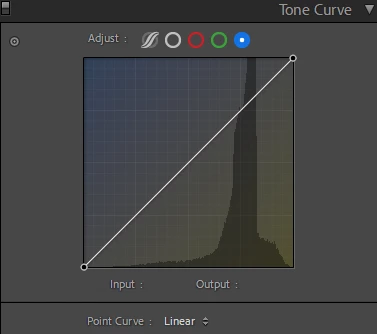
tone curve only default value

4 replies

Participant
February 22, 2025
Screenshot_2025-02-22-17-02-07-20_1c337646f29875672b5a61192b9010f9.jpg
Participant
May 19, 2023

Hello, I have same problem! Does anybody have the solution? 😞


Keith Reeder
Participating Frequently
May 19, 2023

From the post directly above yours:


"You probably need a Preference File Reset."

Participant
May 19, 2023

Yeah, I can read - didn't help, so it's not the solution in my case 😞

Bob Somrak
Legend
April 1, 2023

The curve is being set back to Linear in the Paste.  You probably need a Preferene File Reset.

M4 Pro Mac Mini. 48GB
masktao
masktaoAuthor
Known Participant
April 2, 2023

i just copy old file settings paste to new file, between copy and paste there is no other operate

just go to old file copy and go back to new file(reset state)

what ever, reset file and paste still not work , lost tone curve settings

Keith Reeder
Participating Frequently
May 19, 2023

Did you reset the Preferences file, as Bob suggested?

masktao
masktaoAuthor
Known Participant
April 1, 2023

i don't know what's the problem

try to copy old raw file settings paste to new raw file. many time not work, keyboard shortcut or menu order both not work

some time copy tone curve succes  work fine

try to many time. some time success copy tone curve 

noise copy and paste to new file.but tone curve not copy

some time work some time not work

i don't know how operate to work or not work.