
Participating Frequently
May 2, 2024
Answered

Lightroom Classic 13.2 User Presets Missing

  • May 2, 2024
  • 1 reply
  • 643 views

I'm starting to think AI is messing with Lightroom. In addition to the print module, my crop tool is missing from the quick develope and now my user presets are gone. Is anyone else having similar issues?
This topic has been closed for replies.
Correct answer richardplondon

I am not sure what you mean about Print module, and so far as user presets, can we have a bit more context please?


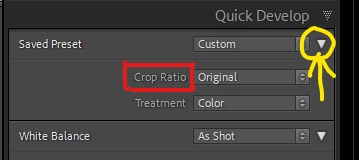
Quick Develop: this has never allowed you to freely modify the crop, but you can impose a chosen "crop ratio" (aspect ratio) here.  This option may be currently hidden for you - if so, you can un-collapse the relevant section of the interface with triangular button at right side of the top subpanel: 

1 reply

richardplondonCommunity ExpertCorrect answer
Community Expert
May 2, 2024

I am not sure what you mean about Print module, and so far as user presets, can we have a bit more context please?


Quick Develop: this has never allowed you to freely modify the crop, but you can impose a chosen "crop ratio" (aspect ratio) here.  This option may be currently hidden for you - if so, you can un-collapse the relevant section of the interface with triangular button at right side of the top subpanel: 

Participating Frequently
May 2, 2024

I had 30+ saved user presets for all my lighting set ups and outdoor conditions and they are gone. 


Community Expert
May 2, 2024

possibilities: a previously used Catalog was set to "store presets with Catalog" and now you are using a different Catalog, such as, a recovered backup. This is not the default option; normally Lrc uses one central location for user presets regardless of different Catalogs.


Unless: this is now a different computer and/or the Catalog is being accessed under a different computer user account. The relevant user presets are therefore not found in that correspondingly fresh central location.


The answer in all these cases, would be to suitably copy them in / suitably change the "store presets with caatalog" option..