
Known Participant
May 27, 2024
質問

Lightroom Classic 13.3 - AI Backround mask leaving halo around dark hair when exposure reduced

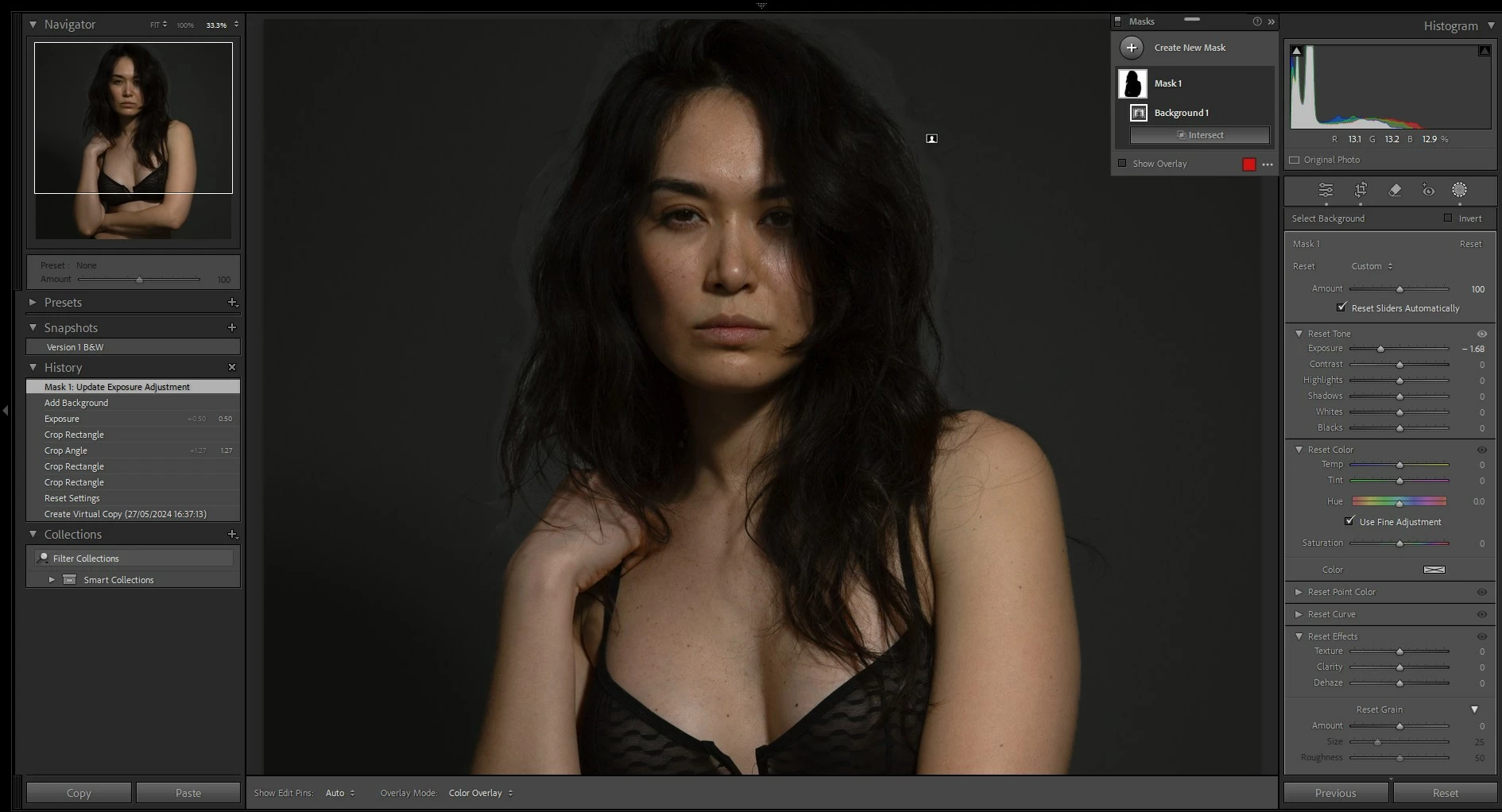
I created a Background mask and dragged the exposure down by 1.68 stops. 

It leaves a strange halo around the hair. 

Photo 1 - before mask
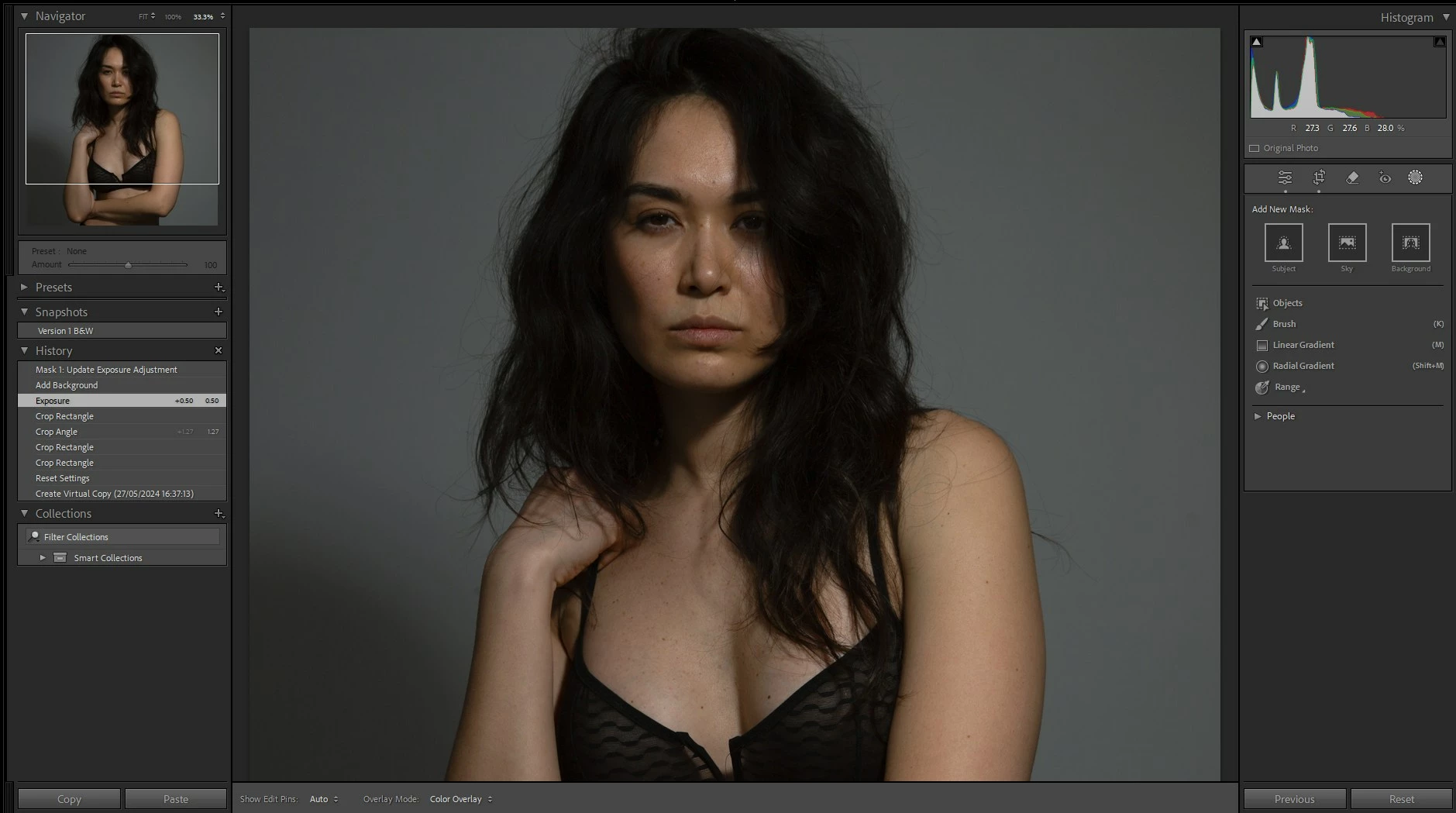

Photo 2 - after creating Background mask and dragging exposure down

This bug also affects existing files, so many files I've worked on previously can no longer be edited or exported. 

このトピックへの返信は締め切られました。

返信数 3

GoldingD
Legend
May 28, 2024

If instead of going directly to the Background mask, you create the People Mask, and then invert that, what occurs?

C.Cella
Legend
May 28, 2024

'Entire Person' mask gets us slightly diffetent selections compared to 'Subject' but still is imprecise.


One can use Objects Mask and invert it and still there will be gaps and halos in the selection.

As I showed it is possible to work and "neutralise" the gaps and halos by subtracting the same mask to itself.
One can edit the halos in a different correction. 


.Ai can get close to what you want BUT most likely one has to refine the selections by doing other masking.

I suggested (years ago) a method to improve Ai selections and make them more accurate but so far was never implemented.


.


Known Participant
May 27, 2024

Sorry, my bad. 
Just reverted to 13.2 and this bug is present in 13.2 also. 


C.Cella
Legend
May 27, 2024

The algorithms should be improved/updated.


I believe it's more than 12 months now that we didn't get an update.


C.Cella
Legend
May 27, 2024

Is not a bug.
AI selections are "imprecise" and hair selections are the hardest to do.

In your case the AI is selecting the "edges" of the hair BUT not the small gasp.


You need to:

. Brush the areas that the Ai selection did not select OR use Radial Filters 

. You can use Objects Ai to also add the parts that are missing.

. You can also use intersections (Ranges for instance) to refine the mask.


. Also do this structure


This kind of Structure will include some of the "halos areas" tha the Background AI selection failed to select.


Known Participant
May 27, 2024
quote

Is not a bug.
AI selections are "imprecise" and hair selections are the hardest to do.

In your case the AI is selecting the "edges" of the hair BUT not the small gasp.


You need to:

. Brush the areas that the Ai selection did not select OR use Radial Filters 

. You can use Objects Ai to also add the parts that are missing.

. You can also use intersections (Ranges for instance) to refine the mask.


. Also do this structure


This kind of Structure will include some of the "halos areas" tha the Background AI selection failed to select.


By @C.Cella

OK thanks. 
However, when I show the mask it shows that the backgroun extends up to the dark edges of the hair (including the few flyaways outside it) but the actual masked area affected by the exposure change doesn't reflect this as you correctly pointed out. 

So maybe we can agree this is something which could be improved in the AI masking algorithm? Otherwise, I might just as well not bother with the AI mask and do it myself manually as I used to. 

Thanks
Stefano