
ahazel
Participant
December 16, 2024
Answered

Lightroom Classic 14.1 Modifying the mask created by the adaptive blur background preset

  • December 16, 2024
  • 1 reply
  • 529 views

I am using the blur background adaptive preset.  But it doesn't select everything perfectly.  How do I refine the mask created when using that preset?   

Thank you for any help.
This topic has been closed for replies.
Correct answer Ian Lyons

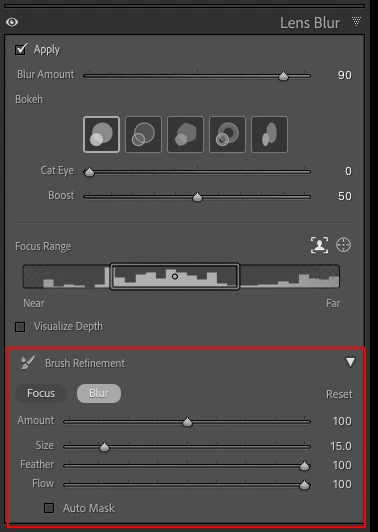
The Adpative Blur presets can be refiened in the same way as you refine any blur. Go to the Lens Blur panel, toggle open the Refinement section of the panel as shown in atached screenshot, then refine the blur as required.


1 reply

Ian Lyons
Community Expert
Ian LyonsCommunity ExpertCorrect answer
Community Expert
December 16, 2024

The Adpative Blur presets can be refiened in the same way as you refine any blur. Go to the Lens Blur panel, toggle open the Refinement section of the panel as shown in atached screenshot, then refine the blur as required.


ahazel
ahazelAuthor
Participant
December 17, 2024

Thank you very much, that is what I needed.