
minimejdh
Inspiring
July 31, 2025
Question

Lightroom Classic 14.4 release unable to get AI tools like Remove to work

  • July 31, 2025
  • 2 replies
  • 293 views

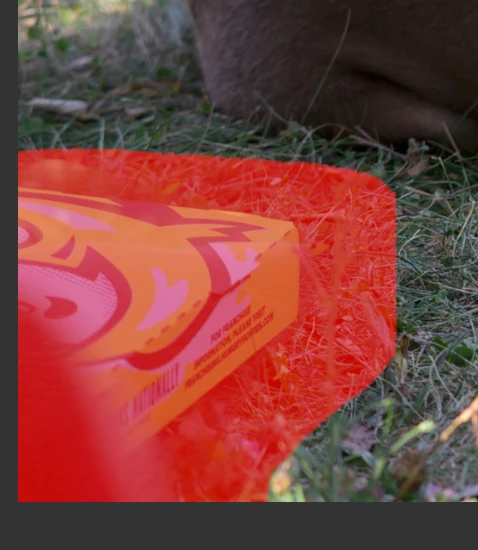
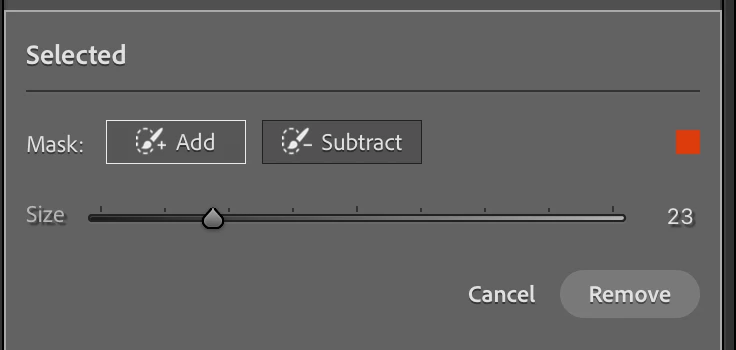
I selected the Remove tool.  Selected Use Generative AI and Detect Objects.  Brushed over object to remove.  But the remove button was not active.  I had a similar issue with the landscape Mask.  What is the problem and the solution?  Creative Cloud is indicating my software is up-to-date. 

[Using Apple 14 inch, M1 Macbook Pro].
2 replies

johnrellis
Legend
August 1, 2025

First, restart your computer. If the problem persists, try resetting LR's preferences:
https://www.lightroomqueen.com/articles-page/how-do-i-reset-lightrooms-preferences/

LR sometimes soils its preferences file, and resetting it can fix all sorts of wonky behavior. That article explains how to restore the old preferences if resetting doesn't help.

Legend
August 1, 2025

@minimejdh 


Did you click on the Remove button and nothng happens or is it your impression that the Remove button is not active?


Despite the appearance of being not active, you might find that it actually is.


On my Windows PC, the Remove button looks similar to yours, but it is certainly active and can be clicked to do the remove.


minimejdh
minimejdhAuthor
Inspiring
August 1, 2025

When I click on the remove button nothing happens   I waited for a long time.