


Participating Frequently
May 7, 2026

Lightroom Classic 15.3 Issues After Update: Red Eye Overlay Bug, Slow Denoise, UI Freezes & Excessive GPU Usage on macOS 15.7.4

  • May 7, 2026
  • 2 replies
  • 49 views

After the latest update I’m observing the following issues:

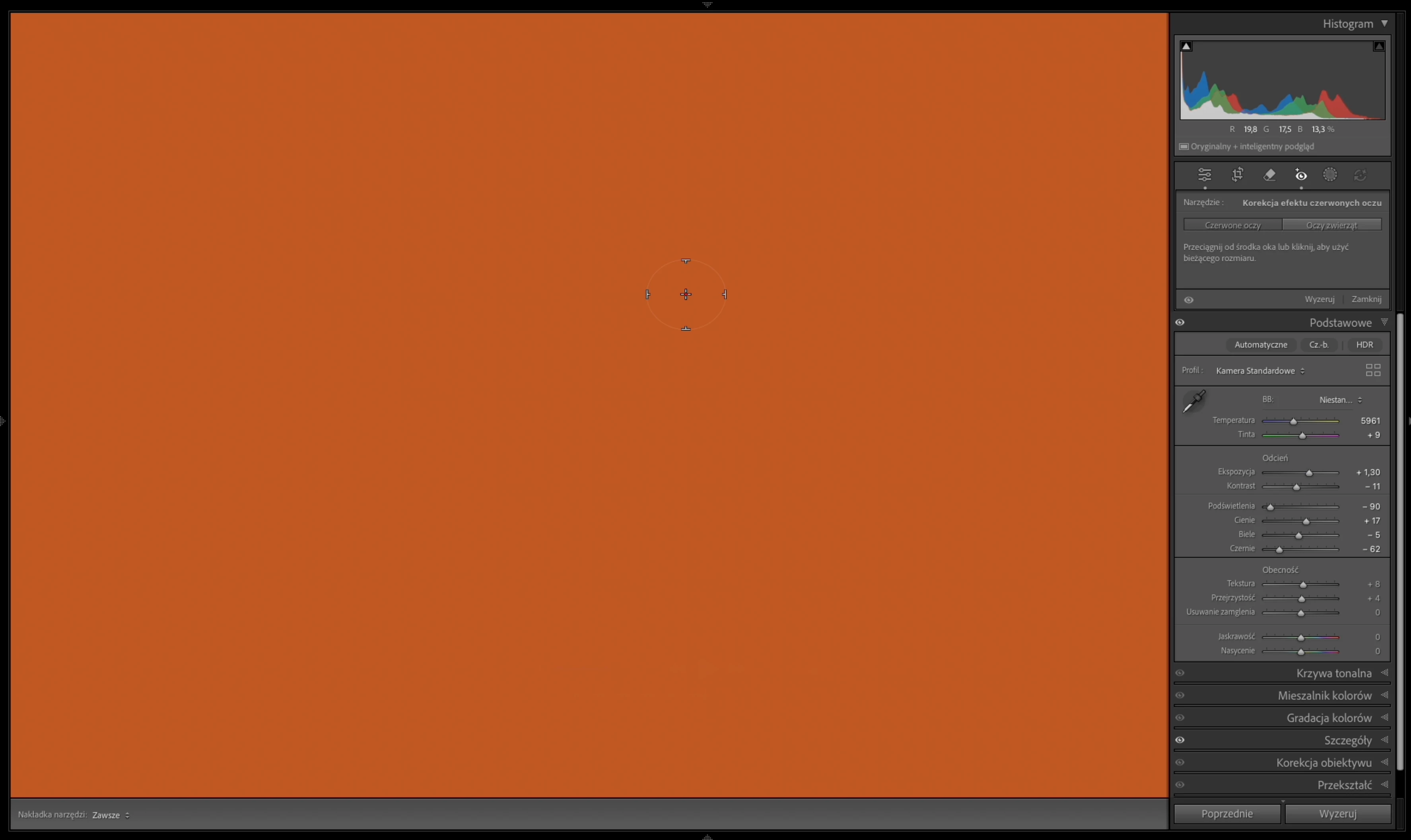
  1. Red Eye Correction tool
    When activated, the entire image is covered with an orange overlay, which makes the tool unusable.
  2. Denoise performance and behavior
    Running Denoise on a larger batch (approx. 100 files) is noticeably slower than before.
    There is no clear indication of remaining processing time.
  3. Overall responsiveness during background processing
    While Denoise is running in the background, Lightroom becomes largely unresponsive.
    Image refresh is significantly delayed, and even basic adjustments (e.g. tonal corrections) take a long time to update.
  4. Hardware utilization
    GPU usage reaches 100%, while CPU (14 cores) shows minimal activity during Denoise.

System:
Adobe Lightroom Classic version: 15.3
macOS version: 15.7.4

Hardware: Apple MacBook Pro 14-inch (M4 Max), 36 GB RAM.

    2 replies

    nik.m
    Community Manager
    Community Manager
    May 18, 2026

    Hi ​@Paweł2588117827o3 , we’re sorry about the trouble with Lightroom Classic. 

    As John suggested, please try updating macOS to the latest version. If you continue to experience the same behavior, please go to the Help menu in Lightroom Classic, select System Info, and copy the text. You can share the information with us either by pasting it in a reply here or by saving it to a text file and sharing the file with us.


    Thanks, 

    Nikunj 

    Participating Frequently
    May 19, 2026

    Right now I’m working on a large project, and I can’t switch to the latest operating system version in the middle of the job — that’s simply not something you do during active production work. Besides that, I honestly don’t like the new system, and I’m losing features and behaviors I’m used to.


    Below is the information about my current system and the current version of Lightroom.


    Wersja Lightroom Classic: 15.3 [ 202604090947-8f3672ed ]
    Licencja: Creative Cloud
    Ustawienie języka: pl
    System operacyjny: Mac OS 15
    Wersja: 15.7.4 [24G517]
    Architektura aplikacji: arm64
    Liczba procesorów logicznych: 14
    Szybkość procesora: NA
    Wersja SqLite: 3.36.0
    Wersja Adobe GSDK: 1.4.0.213

    Źródło zasilania: Podłączony, 96%
    Wbudowana pamięć: 36 864,0 MB
    Dedykowana pamięć GPU używana przez Lightroom: 61,4MB / 27 648,0MB (0%)
    Pamięć rzeczywista dostępna dla Lightroom: 36 864,0 MB
    Pamięć rzeczywista używana przez Lightroom: 1024,0 MB (2,7%)
    Pamięć wirtualna używana przez Lightroom: 405 688,7 MB
    Rozmiar pamięci podręcznej pamięci: 385,4MB
    Wewnętrzna wersja wtyczki Camera Raw: 18.3 [ 2527 ]
    Maksymalna liczba wątków używanych przez Camera Raw: 5
    Optymalizacja SIMD Camera Raw: SSE2
    Pamięć wirtualna programu Camera Raw: 0MB / 18431MB (0%)
    Pamięć rzeczywista programu Camera Raw: 1MB / 36864MB (0%)

    Cache1: 
    NT- RAM:0,0MB, VRAM:0,0MB, Combined:0,0MB

    Cache2: 
    m:385,4MB, n:0,0MB

    U-main: 97,0MB

    Rozmiar podglądu standardowego: 1920 piksele(i)
    Wyświetlacze: 1) 1920x1200, 2) 3600x2338

    Procesor graficzny – informacje: 
    Metal: Apple M4 Max
    Stan inicjalizacji: Użycie procesora graficznego do eksportu jest domyślnie obsługiwane
    Preferencje użytkownika: Włączono użycie procesora graficznego do eksportu
    Włącz tryb HDR w bibliotece: WYŁ.
    Procesor graficzny użyty do generacji podglądu: Wył. (S5_27)

    Folder aplikacji: /Applications/Adobe Lightroom Classic
    Ścieżka biblioteki: /Users/pawelduma/Pictures/Lightroom/Judo Tytan/Judo Tytan.lrcat
    Folder ustawień: /Users/pawelduma/Library/Application Support/Adobe/Lightroom

    Zainstalowane wtyczki: 


    Flagi Config.lua: 

    johnrellis
    Legend
    May 18, 2026

    [View this post in your web browser. It contains formatting and images that don't appear in email.]


    macOS version: 15.7.4


    LR is very sensitive to bugs in graphics drivers, and its AI commands aggressively use the GPU in ways that most other apps don’t. On Mac, the only way to get updated drivers is by updating Mac OS.  Adobe is quite opaque about when it updates graphics drivers, so I don’t think there’s any way to know whether the 15.7 releases, which are mainly security-focused, contain driver updates.  


    So you might try updating to Mac OS 26. If you want to be extra conservative, you could install it on an external drive to see if it makes a difference, allowing you to instantly revert back to 15.7.4 if not.