
Inspiring
May 7, 2026
Question

Lightroom Classic 15.3 Mac OS constant memory leaks leading to freezing & crashing

  • May 7, 2026
  • 2 replies
  • 83 views

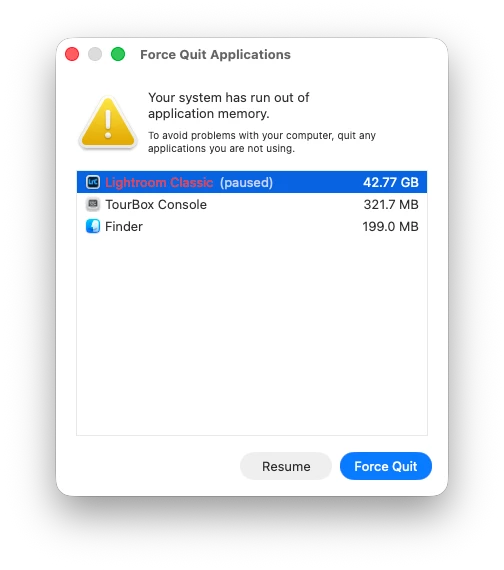
since updating to 15.3, I’m finding that Lightroom Classic is quickly hitting a memory leak and freezing or crashing.  I’m processing RAW Canon CR-3 files, often adding AI object removal, and synchronising my edits across groups of photos (including masks, AI object removals & colour grading).  I find that I can only run for approximately 30 - 60 minutes before I start to encounter memory issues and either the app pauses (and doesn’t come back to life) or crashes altogether.  I keep getting error messages telling me that my system has run out of memory

This has only been a problem since updating to LrC 15.3 a few days ago.

system tech specs:


MacBook Pro (16-inch, 2021)

Apple M1 Max

64gb ram

Mac OSX 26.4.1


    2 replies

    Rikk Flohr_Photography
    Community Manager
    May 7, 2026

    We’ve reviewed the email address you use with this forum and found no crash reports in our system.


    Did you see a crash dialog?

    Do you use a different email address when filling out the crash report?

    Was the crash dialog Adobe’s? Apple’s?


    Rikk Flohr: Adobe Photography Org
    Inspiring
    May 13, 2026

    I’ve only got this email connected to my Adobe account, so all crash reports from me will be under this email address.  The above crash screen showing the memory freezes is an Apple OS error message

    I can’t remember if this crash generated a crash report; I always fill in crash reports when they are offered, but I think the only way out of this memory freeze was to force shutdown my entire computer as there wasn’t any other option (force quit didn’t work).  I suspect that the memory leak / freezes have stopped the Adobe software from generating crash reports when my computer freezes up - there’s zero memory to work with


    I’ve had several more memory leaks clogging up my computer since then; I’ve just rolled back to 15.2.1 to see if this improves the situation (and stops the memory freezes)

    johnrellis
    Legend
    May 7, 2026

    Just in case you don’t know how, see here for how to roll back to LR 15.2:

    https://www.lightroomqueen.com/roll-back-update-previous/

    Inspiring
    May 13, 2026

    thanks for the reminder; I’ve done this occasionally for premiere pro, but it hadn’t occurred to me to do with with LrC (it’s normally much more stable than this!)