
Participant
October 6, 2026
Question

Lightroom Classic 15.6 update caused folders to be unaccessible

  • October 6, 2026
  • 5 replies
  • 19 views

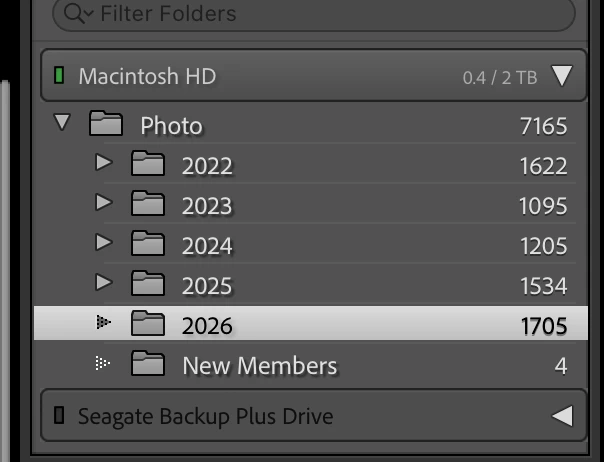
On my Mac (27.01) on Friday 10/7/2026, Lightroom Classic updated to version 15.6.  Prior to the update, my folders looked like this in the Library module:
After the update, they looked like this:
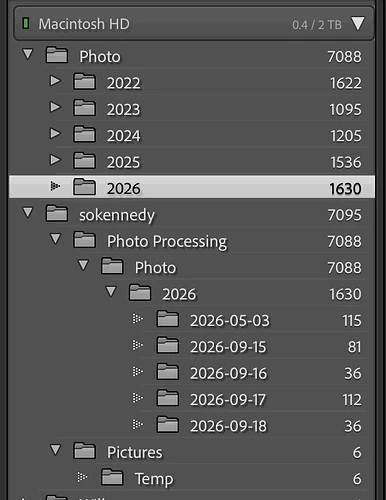
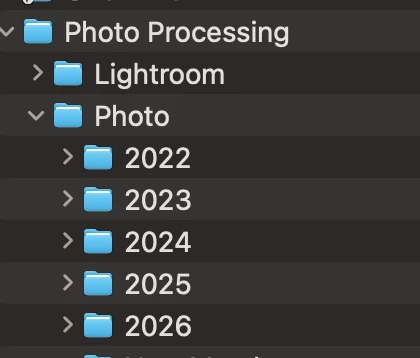
Now only images from the last import are accessible (import was completed several days before the update).  All other folders show the number of images, but will not display any image thumbnails or previews.  How can I solve this?  For additional info, this is a screenprint of the actual folder structure on disk:
 

    5 replies

    Participant
    October 6, 2026

    An update - I mis-spoke and apologize (My frustration level is very high).  There are alpha folders shown in LrC catalog after the update. The Folder shown above called “New Members” was not in this catalog and is not after the update.  I don’t know if the parent folder Pictures was in my catalog before the update but I will use your suggestion to attempt to solve this.  

    JohanElzenga
    Community Expert
    Community Expert
    October 6, 2026

    You also posted this in the LightroomQueen forum, and I think you got the correct suggestion there. This looks like the ‘capitalisation error’. Basically, what happens is that you have two different folders, one called ‘XXXX’ (or a combination of upper- and lower cast) and the other one called ‘xxxx’. In other words, the names are the same, except for the capitalisation of at least one letter. Because MacOS and Windows are case-insensitive, your OS sees those two folders as one and the same folder and so it deals with this without you even being aware of it. You will only see one single folder in the Mac Finder or Windows Explorer!!! But Lightroom is case-sensitive, so Lightroom does see two different folders. Please be aware that this folder is not necessarily the folder you are looking at. It could also be a parent folder (that Lightroom may not show). Here's how to fix the problem. https://www.lightroomqueen.com/capitalization-catalog-error/

    -- Johan W. Elzenga
    Participant
    October 6, 2026

    I’m sorry but this doesn’t make sense to me.  No changes were made to the folders prior to the update, and only the top level parent folders have alpha characters.  This is a more complete view of the folder structure.  Names of subfolders under the individual year folders are system generated dates.  Lightroom Classic worked normally an hour before the update.


    ​​​​​​