

Lightroom Classic 16.0 – Verified Creator Identity Appears as "Not Verified" in Content Credentials
Description of Issue
I have noticed inconsistent behavior in how Adobe Lightroom Classic and Adobe Content Authenticity handle creator identity verification.
My identity has already been verified through LinkedIn and is correctly recognized by Adobe Content Authenticity.
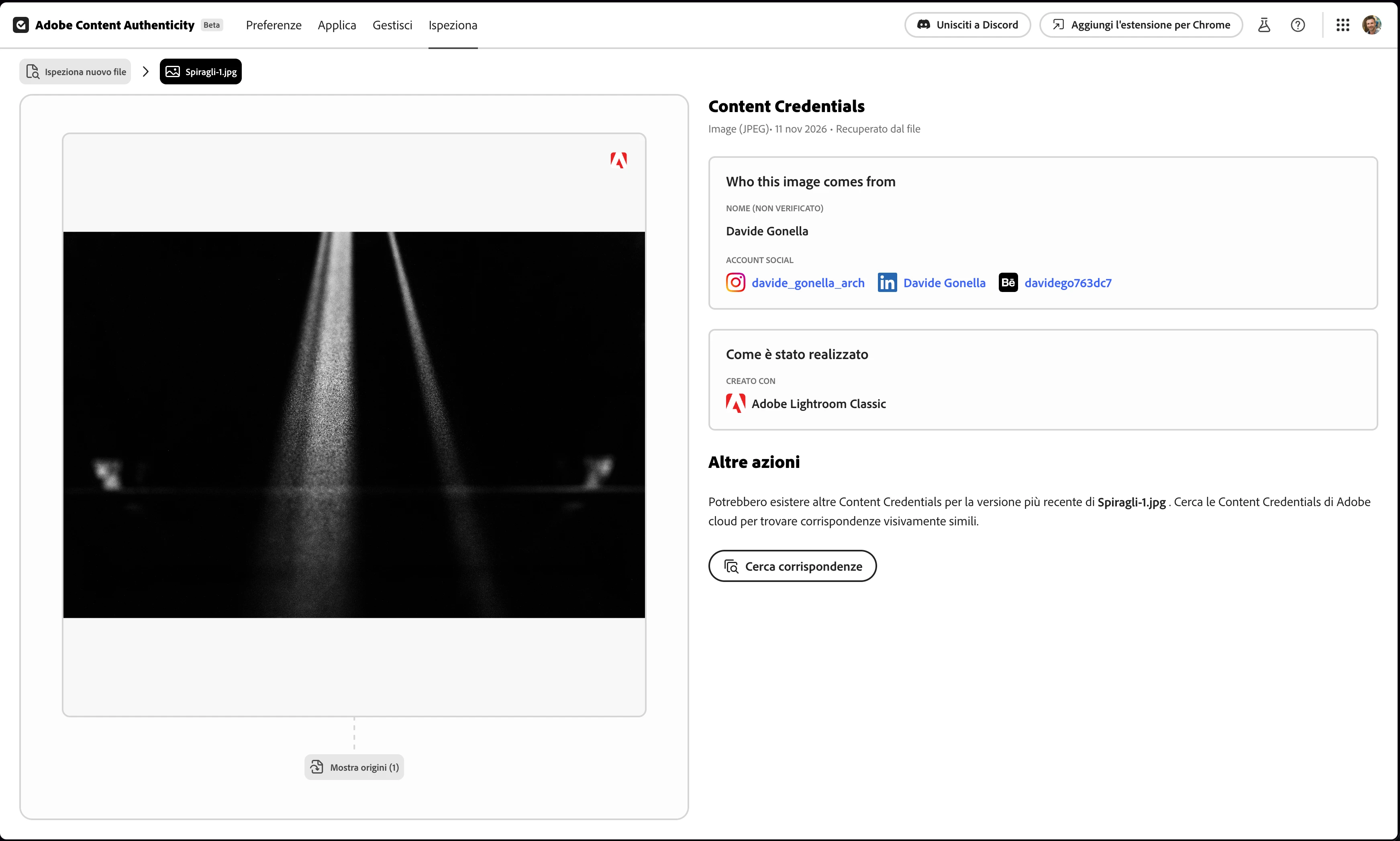
However, when I export a JPEG from Lightroom Classic with Content Credentials enabled, my name appears as "Not verified" when the file is inspected.
To demonstrate this inconsistency, I have attached three screenshots: Test 1, Test 2A, and Test 2B.
System Information
-
Application: Adobe Lightroom Classic 16.0
-
Build: 202611041403-7ac14c66
-
Operating System: macOS Golden Gate 27.2.1
-
Camera: Nikon Z6II
-
Original File Format: DNG converted from Nikon NEF using Lightroom Classic's "Copy as DNG" import option.
Test 1 – Content Credentials Exported from Lightroom Classic
I exported a JPEG from Lightroom Classic using the following settings:
-
Content Credentials enabled.
-
Storage method: Attach to Files.
-
Creator name included.
-
Connected social media accounts included.
-
Editing tools and activity information excluded.
I then inspected the exported JPEG using Adobe Content Authenticity.
Actual result:
My name, Davide Gonella, appears as "Not verified", despite my identity having already been verified through LinkedIn.
The connected social media accounts are displayed.
Attachment: Test 1 – Screenshot showing the unverified creator identity in the JPEG exported from Lightroom Classic.
Test 2A – Identity Verification in Adobe Content Authenticity
I opened Adobe Content Authenticity to apply Content Credentials directly using an image file exported without Content Credentials.
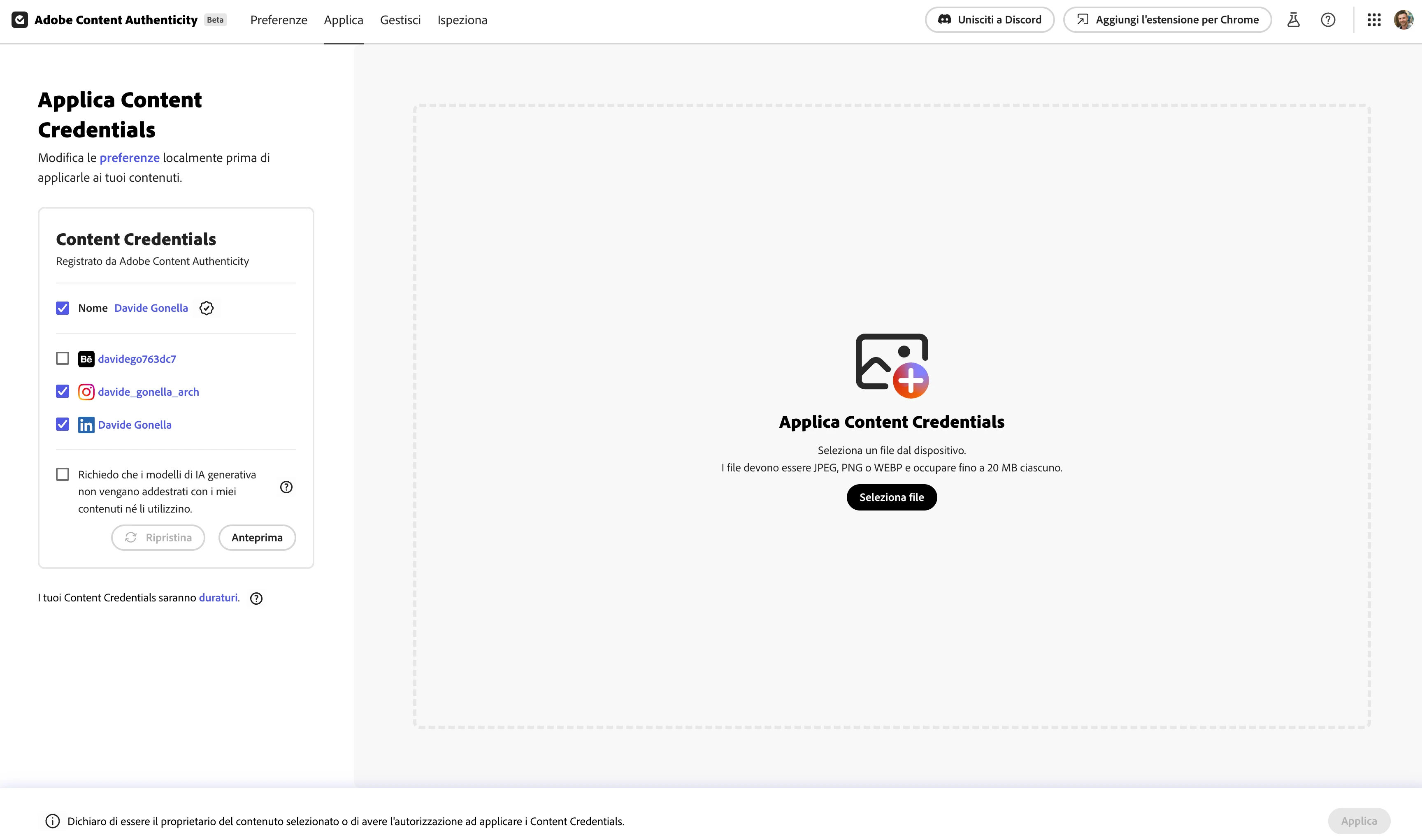
Before applying the credentials, the interface correctly displayed:
-
My creator name: Davide Gonella.
-
My identity as verified.
-
My connected social media accounts.
This confirms that my verified identity is recognized within Adobe Content Authenticity.
Attachment: Test 2A – Screenshot showing the verified creator identity and connected accounts before applying Content Credentials.
Test 2B – Verification of the File Downloaded from Adobe Content Authenticity
I applied Content Credentials through Adobe Content Authenticity and downloaded the resulting file.
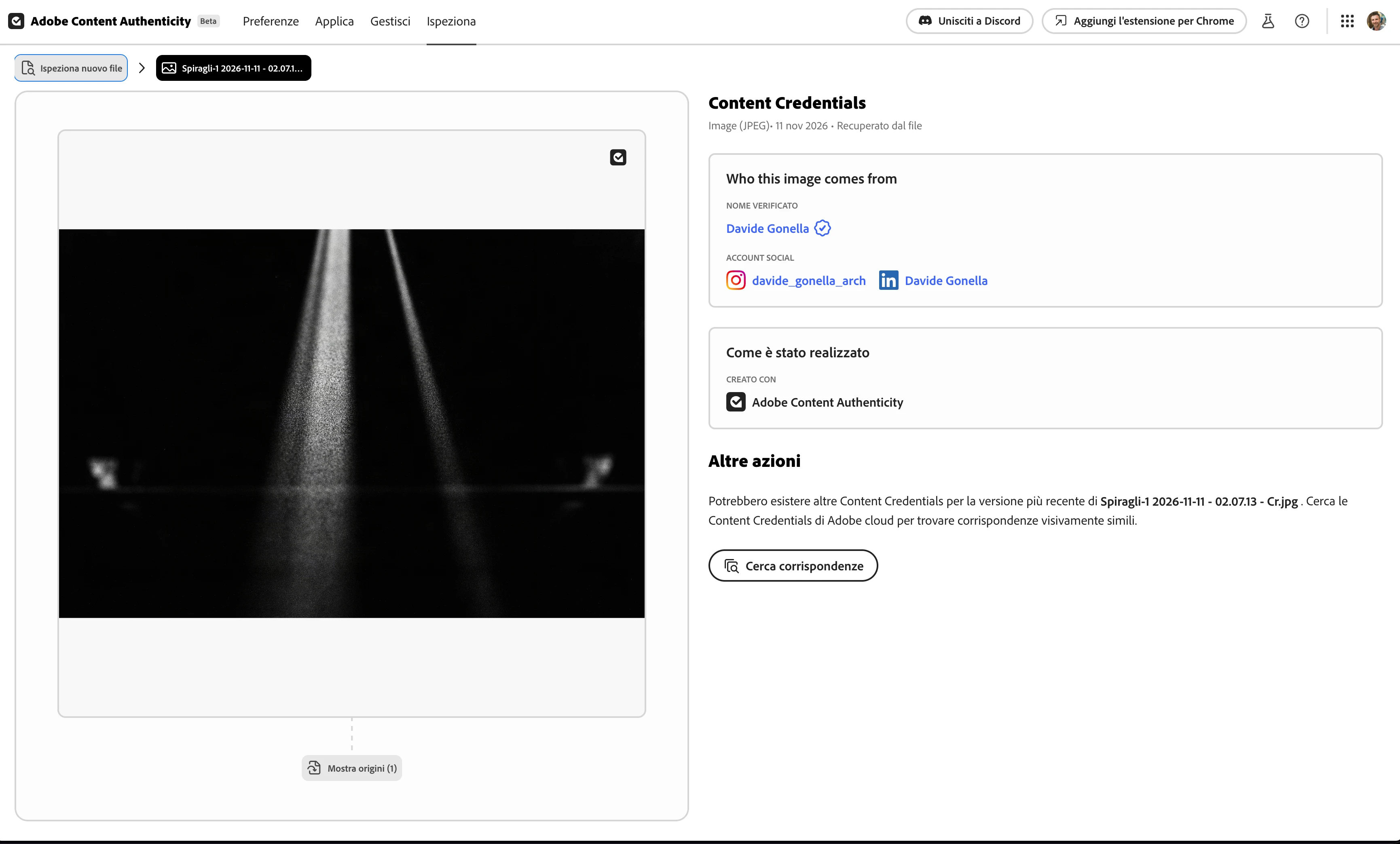
I then inspected the downloaded file.
Actual result:
My creator identity was still correctly displayed as verified.
This demonstrates that Adobe Content Authenticity can successfully include and preserve my verified identity in the resulting file.
Attachment: Test 2B – Screenshot showing that the downloaded file retains the verified creator identity.
Expected Result
When exporting a JPEG from Lightroom Classic with Content Credentials enabled, I would expect my existing verified creator identity to be recognized and preserved, as it is when using Adobe Content Authenticity directly.
The information included in the Content Credentials should also respect the selected export options, except for any mandatory disclosures.
Actual Result
The same creator identity is handled differently by the two Adobe applications:
-
Test 1 – Lightroom Classic: Creator identity appears as "Not verified".
-
Test 2A – Adobe Content Authenticity: Creator identity is correctly shown as verified.
-
Test 2B – Downloaded file from Adobe Content Authenticity: Creator identity remains verified.
This suggests an inconsistency between the two applications in how verified creator identity information is transferred to Content Credentials.
Questions for Adobe
-
Is Lightroom Classic 16.0 expected to support creator identity verification through LinkedIn in the same way as Adobe Content Authenticity?
-
If so, why does an exported JPEG display the creator as "Not verified" when the identity is correctly verified in Adobe Content Authenticity?
-
Is this a known limitation, an implementation difference, or a software bug?
Additional Information
I have attached the three screenshots to illustrate the different results.
If diagnostic logs, sample JPEG files, or additional tests are required, please let me know. I will be happy to provide them.
 AdChoices