KaGue
Inspiring
October 29, 2022
Answered

Lightroom classic

  • October 29, 2022
  • 3 replies
  • 243 views

Hallo,

Lightroom classic, letzte Version, findet beim Maskieren keinen Himmel.

This topic has been closed for replies.
Correct answer johnrellis

Unfortunately, the AI masking commands don't obey the setting of Use Graphics Processor:

https://community.adobe.com/t5/lightroom-classic-ideas/p-ai-masking-should-obey-preferences-gt-performance-gt-use-graphics-processor/idi-p/12480845 


Definitely update your graphics driver by going directly to the manufacturer's web site, as Axel suggested. If that doesn't help, please do the LR menu command Help > System Info and copy/paste the entire output here.


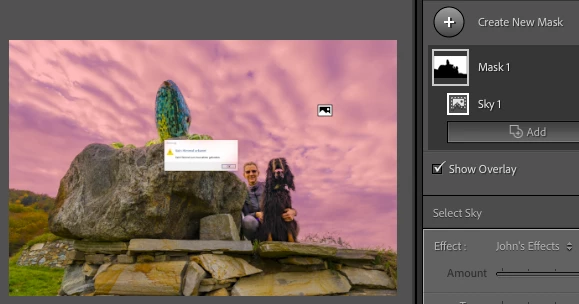
My LR 12.0 / Mac OS 12.6 is able to detect the sky in your screenshot:
3 replies

AxelMatt
Community Expert
Community Expert
October 29, 2022

Please try to switch off the GPU support from the Lightroom preferences and check if that helps to fix the issue.

Go to Lightroom > Preferences > Performance tab > Uncheck "Use Graphics Processor" > Restart Lightroom.

https://helpx.adobe.com/lightroom-classic/kb/lightroom-gpu-faq.html#troubleshooting

https://helpx.adobe.com/lightroom-classic/kb/troubleshoot-gpu.html


If this helps, check your graphic device driver if a new version is available.


My System: Intel i7-8700K - 64GB RAM - NVidia Geforce RTX 3060 - Windows 11 Pro 25H2 -- LR-Classic 15 - Photoshop 27 - Nik Collection 8 - PureRAW 5 - Topaz Photo
johnrellis
johnrellisCorrect answer
Legend
October 29, 2022

Unfortunately, the AI masking commands don't obey the setting of Use Graphics Processor:

https://community.adobe.com/t5/lightroom-classic-ideas/p-ai-masking-should-obey-preferences-gt-performance-gt-use-graphics-processor/idi-p/12480845 


Definitely update your graphics driver by going directly to the manufacturer's web site, as Axel suggested. If that doesn't help, please do the LR menu command Help > System Info and copy/paste the entire output here.


My LR 12.0 / Mac OS 12.6 is able to detect the sky in your screenshot:

KaGue
KaGueAuthor
Inspiring
October 30, 2022

Hallo, es war der Grafikkartentreiber, ich habe diese nochmals neu aufgestezt und alles funktioniert!

Vielen Dank für Eure Hilfe!

KaGue
KaGueAuthor
Inspiring
October 29, 2022

Vielen Dank!

Leider hat der Tipp nicht funktioniert. Im Anhang befindet sich der screenshot .

AxelMatt
Community Expert
Community Expert
October 29, 2022

I can't confirm that. I've been working with LR 12.0.1 (Windows 10) and it worked as it should.


In a first step please try resetting the preferences of Lightroom Classic:   https://helpx.adobe.com/lightroom-classic/help/setting-preferences-lightroom.html

It's recommended to backup your preferences before you reset the preferences to the default settings: 

https://helpx.adobe.com/lightroom-classic/kb/preference-file-and-other-file-locations.html


Can you please post a screenshot that shows the error.


My System: Intel i7-8700K - 64GB RAM - NVidia Geforce RTX 3060 - Windows 11 Pro 25H2 -- LR-Classic 15 - Photoshop 27 - Nik Collection 8 - PureRAW 5 - Topaz Photo