
Lightroom Classic AI tools are making my high end pc stutter and unusable
Well maybe high end is not the best word because its RTX 5060 but still this is not normal. So it goes like this. I open lightroom, i click on masks and detect people, detect sky etc, almost anything that requires AI. It completes normally but then after I switch to another image in develop preview and start using sliders or zooming in photo my whole pc starts to stutter so bad that only solution is to close lightroom and reopen it. If i have music in background it starts crackling, my mouse cursor starts to freeze and stutter, just unusable.
AI things that trigger the problem:
- Masking but smart features like detect people, objects, sky etc.
- Super Resolution
- Lens Blur
AI things that don’t trigger it:
- Remove tool
- Denoise
Things I noticed when problem starts:
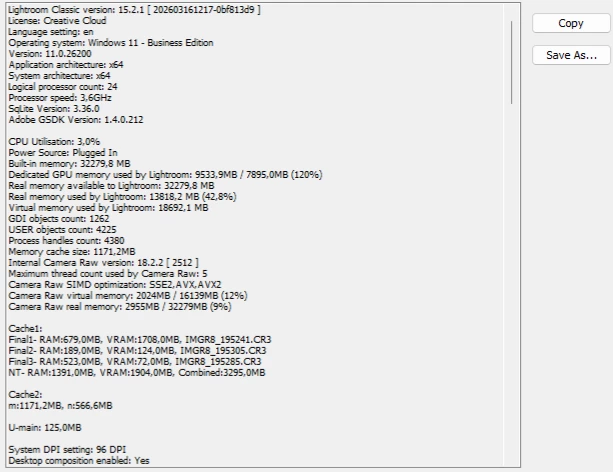
GPU memory fills to max, Lightroom system info reporting GPU memory is at 120% (is that normal ?)
GPU usage jumping to 100% when zooming photo causing stutter to PC
GPU memory doesnt go back it stays at max all the time even when AI job is finished.
In short:
- Detect People completes.
- Lightroom appears normal.
- I zoom or switch images in develop mode.
- Lightroom enters a bad state.
- Closing Lightroom fixes it
I spent 3 days with chatgpt and various topics online nothing helps expect disablig GPU acceleration for image processing, now I know that this is a temporary fix but whats the point of not using GPU, it shouldnt freeze whole pc.
Things I tried to solve this:
- Fully reinstalling Lightroom, uninstalling all adobe programs with creative cloud cleaner tool and manually deleting every adobe folder I found on my system including those in program files, common files, program data, local and roaming folders.
- Tried older versions of Lightroom up to version 14
- Tried other catalogs or creating new ones
- Reseting all lightroom settings to default
- Increasing raw cache in performance tab to 100gb
- Fully uninstalling gpu drivers using DDU tool from safe mode
- Installing latest studio driver
- Installing latest gaming driver
- Installing older drivers
- Putting my old GPU to test (GTX 1080)
- Changing BIOS to previous version
- Changing some options in BIOS like cpu C state, Resizable BAR
- Disabling HAGS in Windows
- Disabling GSYNC
- Closing all RGB software like Razer synapse, steelseries etc.
- Setting lightroom power to full performance in nvidia panel
Noone of above solved my issue.
Photoshop works fine when using AI stuff, I also tried Topaz AI and no issues. I can play games normally.
Both Lightroom and Lightroom classic are having the same issue.
I did put my RTX 5060 in older pc and I don’t have that problem.
My old system:
i7 7700k
Asrock Z270 Extreme
16gb ddr4
GTX 1080
Windows 10
New system:
Intel Core Ultra 270k
Asus Rog Strix Z890-A
32gb ddr5 @6000mhz
RTX 5060
Windows 11
Only thing I didnt try on new pc is to maybe install Windows 10 but first I want to troubleshoot via forums.
So how is possible that older hardware and Windows 10 works better for AI ? Could it be hardware related (maybe motherborad or CPU) or Windows version ?
Any tip or advice is welcome


 AdChoices