Participant
September 18, 2025
Answered

Lightroom Classic: built-in vs explicitly selected lens profiles

  • September 18, 2025
  • 3 replies
  • 243 views

Hi. I have a Sony E Mount Sigma 10-18mm f2.8 lens and I'm a bit confused about which lens profile I should be using in Lightroom. To my eye, the automatically selected built-in profile (whose info dialog shows the correct lens) looks a lot different, and worse, than the one that can be manually selected named "SIGMA 10-18mm F2.8 DC DN C023, SONY".


If I would like to use the manually selected profile instead of the built-in one for all imported files, how do I do that? 


[Mod: Moved to the Lightroom Classic forum]

 

Correct answer JohanElzenga

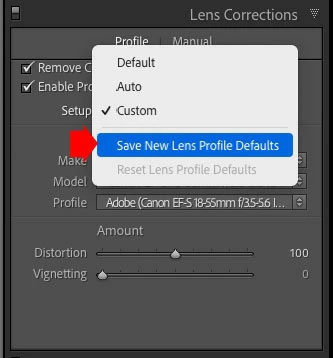
I get the feeling that the two answers given are not (completely) answering your question. This is not solved by creating a raw default preset, this requires first and foremost a different lens profile default setting. To make Lightroom Classic automatically select the lens profile you want, select it in the Lens Corrections panel and then click on the drop down menu next to "Setup". Choose 'Save New Lens Profile Defaults' to make this profile the new default. From now on, this lens profile will automatically be chosen for this particular Sigma lens.


Next, if you want to automatically enable lens defaults (which will be for all lenses, not just this lens), create a preset for it and follow the instructions given by Aleke.


3 replies

JohanElzenga
Community Expert
JohanElzengaCommunity ExpertCorrect answer
Community Expert
September 18, 2025

I get the feeling that the two answers given are not (completely) answering your question. This is not solved by creating a raw default preset, this requires first and foremost a different lens profile default setting. To make Lightroom Classic automatically select the lens profile you want, select it in the Lens Corrections panel and then click on the drop down menu next to "Setup". Choose 'Save New Lens Profile Defaults' to make this profile the new default. From now on, this lens profile will automatically be chosen for this particular Sigma lens.


Next, if you want to automatically enable lens defaults (which will be for all lenses, not just this lens), create a preset for it and follow the instructions given by Aleke.


-- Johan W. Elzenga
__dieu7__Author
Participant
September 21, 2025

Thanks for all the answers. Johan's answer is exactly what I was looking for.

Conrad_C
Community Expert
Community Expert
September 18, 2025

To control which lens profile is applied at import, I think that can be part of a customized default import preset. Create a preset that applies the lens profile you want, then assign that preset as the default for import. If you haven’t done this before, Julieanne Kost wrote a detailed article about it, linked below. The info about saving setttings such as the lens profile is in the section “How to Create a Preset in Lightroom Classic” in the article. You’d create the preset after selecting an image that has the profile applied, so that when you open the New Develop Preset dialog box and select Lens Profile Corrections, that profile setting is what’s included for Lens Profile Corrections in the preset.


Setting Custom Raw Defaults in Lightroom Classic – Julieanne Kost


Note that as Aleke’s post shows, import default presets can be camera-specific. So if you have multiple cameras, the preset can be set up to apply only to the camera that would have that lens on it. Also, if you don’t always use that lens on that camera, every time you open the Import dialog box you can choose a different import preset.

Community Manager
September 18, 2025

Hi @dieu7, welcome to the community!

You can definitely set presets on import for specific cameras. Here’s how:

1. Check the "Override" box
2. Choose your camera model
3. Pick the preset you want to use as the default
4. Click "Update Default"
Let me know if that helps or if you have any questions!

Alek


*(If you mention me with an @, like @Aleke, I’ll get a notification and can respond faster.)*