Participant
September 19, 2022
Answered

Lightroom Classic Catalog Folders

  • September 19, 2022
  • 2 replies
  • 238 views

I just recently purchased Lightroom Classic and accidently deleted the "Catalog" dropdown menu button from under the "Navigator" drop down menu.  Can anyone help me in somehow getting that back?

Thank you

This topic has been closed for replies.
Correct answer GoldingD

Right click on one of the dark gray areas, and re-check catalog
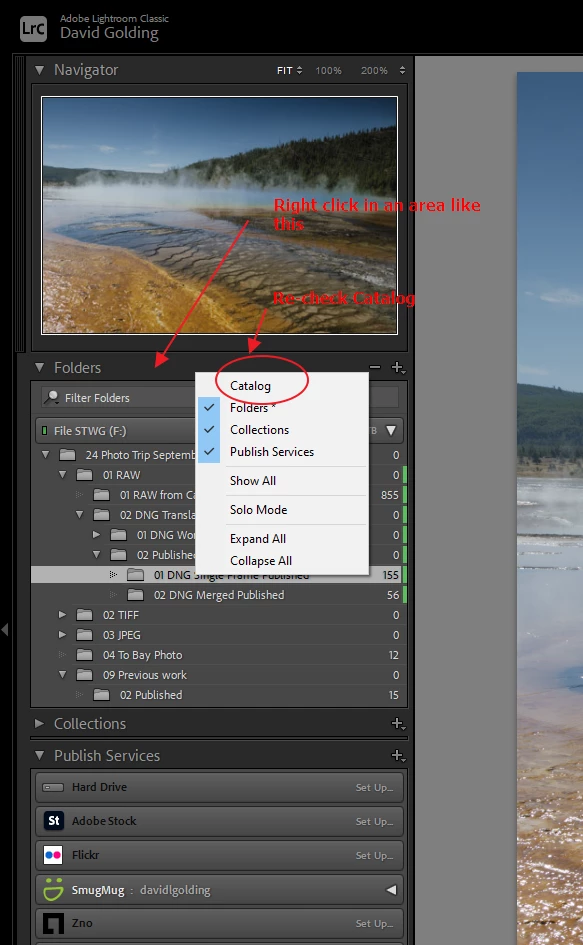


and see:

Find Your Missing Lightroom Panels, Tools, and More: Laura Shoe

2 replies

dj_paige
Legend
September 19, 2022

Ctrl-Shift-1 on Windows (or whatever the Mac equivalent is)

OR: go to the Window menu, select Menu, select Catalog

GoldingD
GoldingDCorrect answer
Legend
September 19, 2022

Right click on one of the dark gray areas, and re-check catalog


and see:

Find Your Missing Lightroom Panels, Tools, and More: Laura Shoe

Participant
September 19, 2022

Oh my gosh....thank you so much.


Have a great day

GoldingD
Legend
September 19, 2022
quote

Oh my gosh....thank you so much.


Have a great day


By @Tonya26190835zcwt


"If you received a solution to your question/issue that resolved your problem/doubts, please mark it as correct. This will highlight the answer within the post and in the community and will help fellow community members if they experience the same issue as you, or have the same question."


ref: Community How-To Guide - Tips & Best Practices: Adobe
