
Participant
July 12, 2023
Question

Lightroom Classic catalog on external drive not opening

  • July 12, 2023
  • 1 reply
  • 296 views

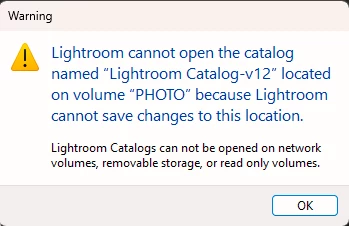
Having a pretty big issue. I have an external hard drive where I store all of my photos, along with my Lightroom catalog. Up until a couple of days ago, this hard drive was used exclusively on Mac. I now have also gotten a PC, and want to edit/use Lightroom on it. When pluggin in my hard drive (which is formatted to ExFAT), Windows does see it (although I have to assign a letter each time) but when trying to open the catalog from the hard drive I get the error in the photo.


I tried editing the properties of the folder to remove "read only" but after "removing" it and closing the properties window, the read only attribute is checked again. 


Not sure what to do here, as I am also relatively new to Windows. Any help is extremely appreciated. 
This topic has been closed for replies.

1 reply

Sameer K
Community Manager
Community Manager
July 13, 2023

Hey, @dahiam. Welcome to the Lightroom Classic community. I'll help you figure this out. What version of Lightroom Classic are you working on?


To restore functionality, move the catalog to the internal drive.


  • Press the ALT/OPT (/Windows/macOS) when launching Lightroom Classic.
  • Choose the option to create a new catalog and create a new one on the internal drive.
  • In the new catalog, head to File > Import from Another Catalog, as shown below.
  • Proceed with merging the (potentially)corrupted catalog into the newly made, internal storage-based catalog. 

    For more help via video-based steps, check here. See Merging individual catalogs into a master catalog


Test & move this new catalog to the external drive. For the drive letter situation, it's better to designate the external drive with a drive letter to avoid reconnecting missing images whenever there is a change in the drive letter. Follow the steps shared here: https://learn.microsoft.com/en-us/windows-server/storage/disk-management/change-a-drive-letter


Let me know how it goes. Thanks!
Sameer K