Inspiring
April 10, 2019
Question

Lightroom Classic CC ...brush controls have disappeared

  • April 10, 2019
  • 3 replies
  • 158 views

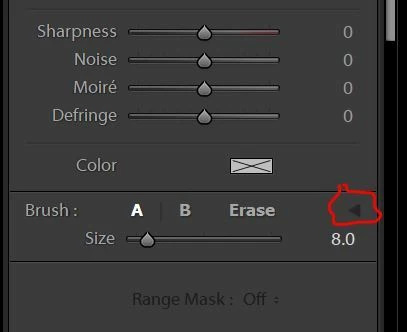
For a long time now (several frustrating months!), I’ve been unable to find my brush controls (Develop/brush/down near the bottom of the section--just below the sharpness/Noise/Moiré/ Defringe sliders), even though I knew they were there—I just couldn’t see exactly where they were! ☹  Well, I finally figured out what was wrong and why I couldn’t see them.  They were turned off--the switch is circled in red, below.  The problem is the interface colors.  It's nearly impossible to see the very black arrow head against its black background...  (Black on black???  Who’s designing your interface controls these days, Adobe??????  It looks like a visit to the woodshed is in order!)


Here's what it looks like when the brush controls are enabled, but I can still barely make out the triangle pointer (again, circled in red, below):
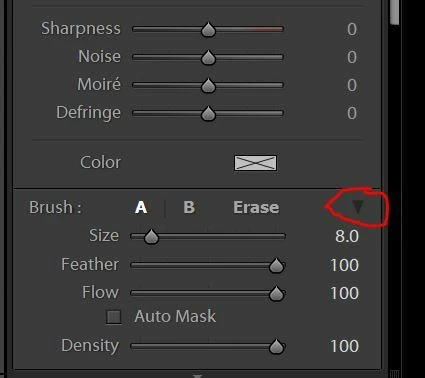


Perhaps you can suggest to the engineers that they make those kinds of settings a bit more obvious?  Perhaps a white arrow head (or any color except colors in the black gamut)?  I realize that you’ve got a lot of young eyes looking at LR these days, but you’ve also got some of us—the older and not yet blind—but keep this up and we will be!—users!  My rule of thumb?  Make it stand out so people can see the switches.  No reason not to.
This topic has been closed for replies.

3 replies

Inspiring
April 12, 2019
My issue is not turning the control on or off.  My issue is that I couldn't/can barely see the control in the first place.  On my system said controls are not "a little hard to see".  They're almost impossible. There's only one reason for that.  Crappy interface design.  There's simply NO OTHER EXCUSE/ REASON.  Adobe should be ashamed.  You need to change your black on black controls to some color--I like some of the really nice bright ones or white--that can be seen by almost everyone, instead of hidden as they are now.  There's no secret on how to do this!
Rikk Flohr_Photography
Community Manager
April 11, 2019
Turning off brush controls is a very powerful tool. When you do this it gives you the ability to increase or decrease the effect of multiple sliders within a single local adjustment slider.

Example adjustment: 
Exposure +1
Blacks -30
Clarity +10
Saturation -15
Sharpness +10
Tint : Red (0 H and 15 sat)

Now you want to reduce or increase the effect a little bit. You can go back through and tweak each individual slider the correct direction or you can collapse and use the Amount to dial up or down the effect - moving all sliders at once regardless of their original direction from zero. 

I do agree it is a little hard to see.

Rikk Flohr: Adobe Photography Org
Known Participant
April 11, 2019
Good post! I've used LR for 3 years now and hadn't yet spotted this switch. Why indeed would anyone want to turn off brush controls?! A presets menu would be more to the point.