



Lightroom Classic CC keeps complaining about AgKernel.dll Error
Hi Adobe,
Through the Adobe Creative Cloud App, I have "upgraded" to Lightroom Classic CC from the original Lightroom CC. The installation went smoothly, in that it installed the Classic CC then uninstalled the original non-CC version. I launched the new app, and it offered to upgrade/update the old catalog file, and that went smoothly too.
But here's the problem: After working on it yesterday and quitting the app overnight, I tried to relaunch the app and it gives me an annoying error message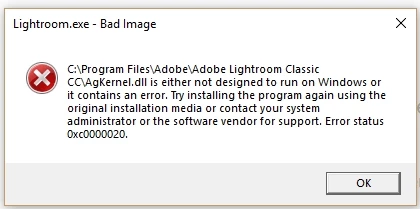
The only way to resolve this problem is to uninstall the app from Creative Cloud app, and reinstall it again. Then it launched successfully. I worked on another bunch of files, quit the app. A few hours later, the app again would not start, the same dialog box came up again. Have to uninstall, and reinstalled again. It worked........ get the picture?? I suspect I have to do this over and over again until someone at Adobe figured out a way to fix this bug. I am using Windows 10 Fall Creators Update 1709, 64-bit, in case this is important.
Did I also mention I tried to call Adobe through a land line, the automated message asked me to leave my name and a callback number -- so I do not have to wait on the phone. I did. The "system" called me back after about 45 minutes. Within a few minutes, I was on the line with a HUMAN BEING !!! I explained my problem, and was transferred to another desk/line. Little did I know that I will be on hold for 3 hours 50 minutes (and still counting), with the same music playing over and over again. I don't even know if someone will answer me anymore, it's well past 9 pm ET !!! zzzzzzz
 AdChoices