Participant
June 22, 2018
Question

Lightroom Classic CC: over 90% CPU during export

  • June 22, 2018
  • 5 replies
  • 10062 views

Since few months I almost can't work in Lightroom or any other software on my computer during Lightroom export as it's using around 90% off mu CPU. Maybe exporting itself is a bit faster but when exporting 2000 pics I'm unable to work for over half an hour as there are huge lags (even in mouse movement). In the end I would rather prefer slower export working in a background and still have ability to work with pics without such noticable slow down. It was much better balanced before updating to Classic CC. It doesn't depend on number or size of files exported. I had to take a picture of task manager with my phone as while exporting my computer wasn't reacting to print screen button.  It's quite annoying and it slows down my workflow a lot.
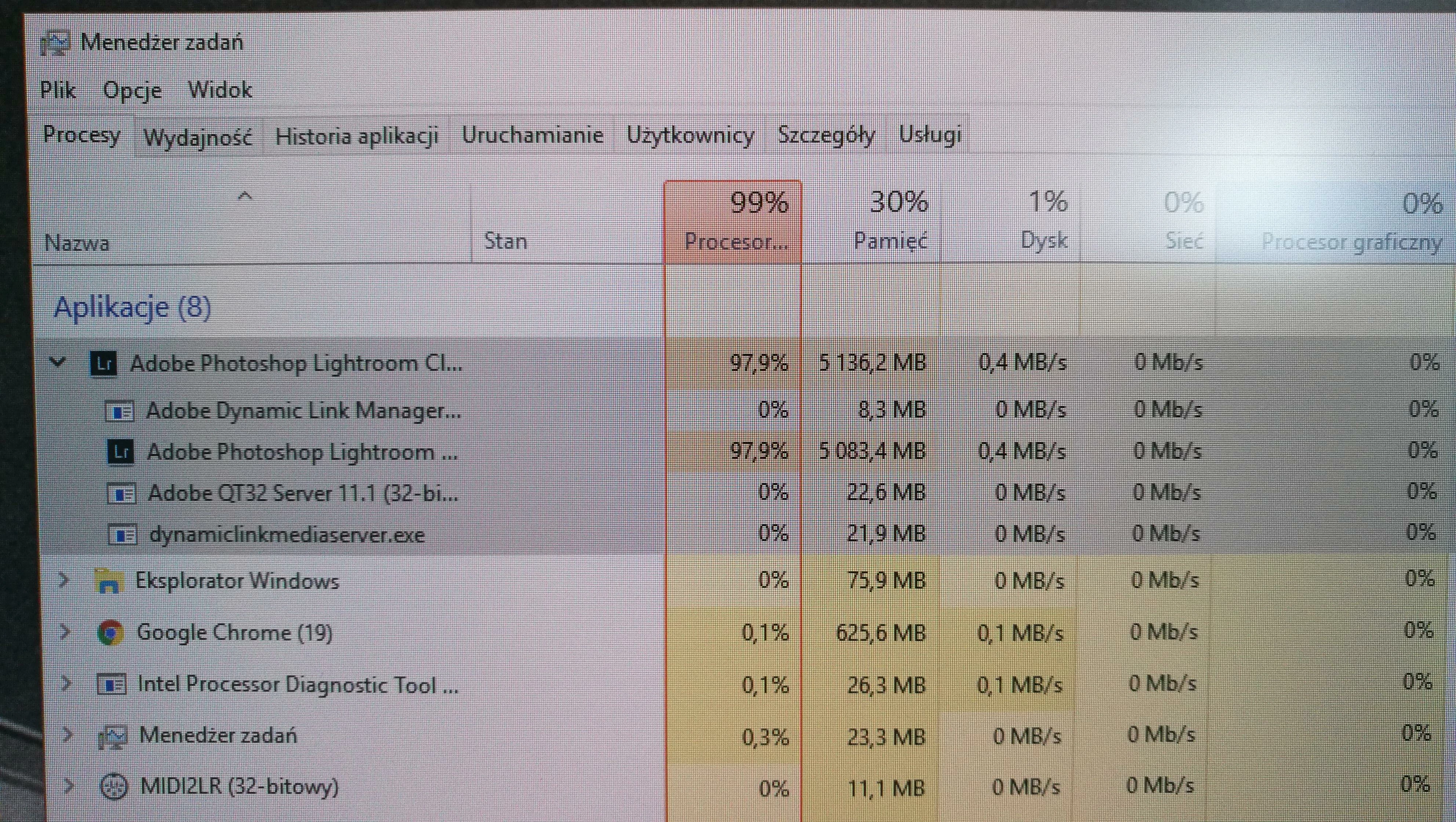
My CPU: Intel Core i7-6700K (4 cores, od 4.00 GHz do 4.20 GHz, 8 MB cache)

32GB RAM, nVidia GeForce GTX 1070

Lightroom catalogue is on SSD and exporting files to WD Black HDD

Lightoom ver 7.3

This topic has been closed for replies.

5 replies

johnrellis
Legend
July 14, 2020

[This post contains formatting and embedded images that don't appear in email. View the post in your Web browser.]


"LR CCc 2020 runs horrid on my 2018 Mac Mini 3.2 GHz 6-Core Intel Core i7 with an eGPU vs my 2018 Macbook Pro with a 2.2 GHz 6-Core Intel Core i7. When exporting files on the macbook, I can still do other tasks. With the mini, I cannot. "


Verify that you have Lightroom Classic 9.3 installed by doing Help > System Info (there is no product Lightroom CC anymore). If you indeed have Lightroom Classic but an earlier version, update to LR 9.3 by doing Help > Updates.  If the problem still occurs, then you're being struck by the bug reported here:

https://feedback.photoshop.com/photoshop_family/topics/classic-cc-uses-90-cpu-during-export


For most people, LR uses most of the CPU during export but leaves enough unused to do other tasks on the computer or in LR. But for a minority of people, it hogs the entire CPU.


Please add your constructive opinion to the bug report, and be sure to click Me Too and Follow in the upper-right corner. That will make it a little more likely that Adobe will prioritize a fix, and you'll be notified when the bug's status changes. (Safari users, uncheck the option Safari > Preferences > Privacy > Prevent Cross-Site Tracking or use Chrome or Firefox.)


If Help > System Info shows that you have plain "Lightroom" (which is the cloudy version) rather than "Lightroom Classic", then you should post in that forum:

https://community.adobe.com/t5/lightroom/bd-p/lightroom?page=1&sort=latest_replies&filter=all


[Use the blue reply button under the first post to ensure replies sort properly.]

Inspiring
July 14, 2020

Yes, I'm using LrC 9.3 my acronyms were incorrect. I'll report the bug. Thank you.

Participant
August 1, 2022

I have the same issue as everyone else, but I do have a fix. Buy a mac. My $800 M1 mac mini runs Lightroom better than my $5000 custom PC. It's slower for sure but more reliable and I can do emails while it's exporting. Maybe it's a Ryzen thing but I have no idea why LR is such a dog on the PC and works beautifully on a Mac

Participating Frequently
December 6, 2019

LR is absurd on export. I can do no work when exporting files. If speed is necessary I suggest you all move over to CaptureOne - they have figured it out. It exports extremely fast. 

Inspiring
July 14, 2020

LR CCc 2020 runs horrid on my 2018 Mac Mini 3.2 GHz 6-Core Intel Core i7 with an eGPU vs my 2018 Macbook Pro with a 2.2 GHz 6-Core Intel Core i7. When exporting files on the macbook, I can still do other tasks. With the mini, I cannot. Files and catalog are stored on a NVME.2 ssd over thunderbolt 3. LR CCc ran fine prior to all version of 2020 on both machines.

ManiacJoe
Inspiring
September 30, 2018

Referencing the Windows Task Manager in the OP, one option is to lower the process priority of Lightroom before you kick off the export:

In the "processes" tab, right-click on Lightroom, select "go to details".

In the "details" tab, right-click on Lightroom, select "set priority" > "below normal".

This should give the foreground apps the responsiveness you desire while letting Lightroom consume all the unused CPU time.

fviero
Participating Frequently
September 30, 2018

I´m on version 7.5 and Lr lags a lot while exporting. I´ve turned off GPU just in case. Same thing. Exporting photos is now a slow and resource hungry process. CPU tops at almost 100% and stays there during the whole export rendering the whole system unusable.

dj_paige
Legend
September 30, 2018

fviero  wrote

I´m on version 7.5 and Lr lags a lot while exporting. I´ve turned off GPU just in case. Same thing. Exporting photos is now a slow and resource hungry process. CPU tops at almost 100% and stays there during the whole export rendering the whole system unusable.

As stated above, this is how LR 7.5 works when you do a large export, it uses a lot of resources.

fviero
Participating Frequently
September 30, 2018

While testing, the only difference between a "small" (3 pictures) export and "large" (26 pictures) is CPU spike duration. No matter how many pictures, the CPU will spike as long as the export is running, so i guess it´s not dependent on how large the export is.

System Specs are not top notch but they can handle very well other intensive tasks without hogging resources

AMD FX-6300 6 core OC´ed to 4.2Ghz

16GB RAM

Nvidia GTX 960 4gb GDDR 5

Lr is running on a Kingston SSD

Mohit Goyal
Community Manager
Community Manager
June 22, 2018

Hi adamj,

We're really sorry for all the trouble. Could you please update Lightroom to 7.4 version via Creative Cloud desktop app and check f that helps.

Also, turn off the GPU from the Lightroom preferences and let us know the results.

Go to Lightroom > Preferences > Performance > Uncheck GPU > Restart Lightroom.

Regards,

Mohit

Participant
June 22, 2018

I have updated to 7.4 and GPU is and was always disabled but it did not change anything...still using over 90% CPU. When editing pics like applying presets etc. it stays under 50% (20-50%). Only on export goes it is over 90%.

Regards,

Adam

johnrellis
Legend
June 22, 2018

Adobe has struggled from the beginning getting the right balance between export throughput and interactive response, across the wide range of users' machines, file formats (raw is particularly CPU intensive), workflows, and editing styles. Originally and for many years, there were many complaints that LR didn't take full advantage of multiple CPUs, and people would fire up multiple concurrent exports manually or use a plugin to do that. But in LR 6 (I think) Adobe changed LR to be more aggressive in using multiple CPUs. Based on the reports in the forums, I think that generally works well, but there have been continual reports like yours where it fails.

It's not a simple engineering problem. I've worked on these sorts of problems in years gone by, and my most recent LR plugin faces the problem too. Given that there's always been some fraction of users for whom LR gets it wrong, it's clear that Adobe isn't able to implement a completely automatic rule, and in such situations, the traditional solution is to give the user a knob that controls how aggressive the export is at using the CPUs (that's what my plugin does). Product designers understandably hate throwing in a new manual knob each time a problem rears its head, but I think it's called for here.

Regardless, Adobe wants all product feedback posted on the official feedback site: Lightroom Classic CC | Photoshop Family Customer Community . I suggest you repost there, and be sure to include the first ten lines or so of Help > System Info. LR product developers actively participate there but are rarely seen in this forum.