
Lightroom Classic crashes every few mouse clicks
Hi,
I see several threads of this and am yet to find a solution.
Every few clicks, Lightroom crashes. I can barely get anything done.
Oddly enough, I have the same problem on the creative cloud version of Lightroom as well.
Can't pinpoint what causes the program to crash. Sometimes it's changing from one photo to the next, sometimes clicking a dragging a slider or preset button... cannot find a pattern. Just seems like I'm reopening the application every minute or two.
The crash looks different. Most of the time, the program simply exits to desktop. Occasionally it freezes and I have to force-quit through task manager. On some occurrences, the display is destorted/garbled or has something odd going on. I've attached a screenshot (NOTE - this is from the cloud version of lightroom but I get the same thing in both versions).
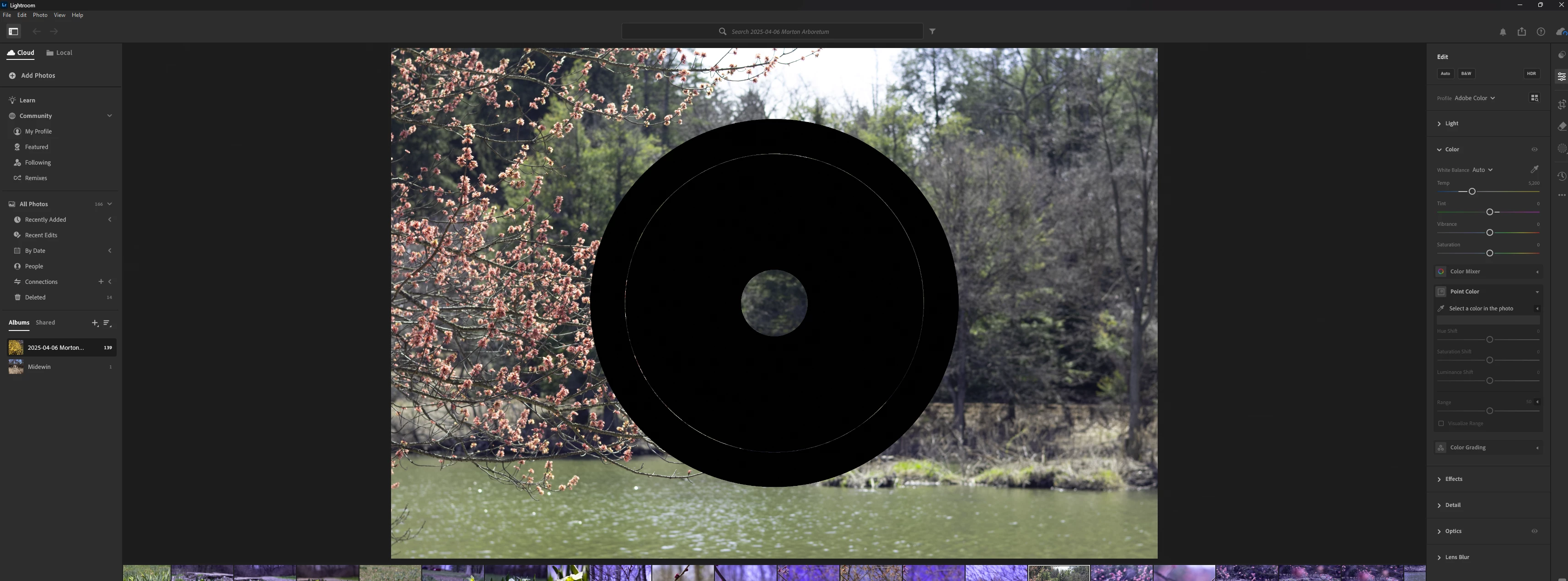
System resources look fine. LrC says it's only using 20% of dedicated GPU memory and 6.1% RAM. CPU load hovers around 5%.
Most of the time I'm editing a Canon CRAW file. But it happens regardless of file type/size.
I've also tried changing whether the app is using the GPU or not. Seems to make no difference.
Thanks for your help/input.
LrC version: 14.2
OS: Windows 11.0.26100
CPU: AMD Ryzen 5700X (3.3 GHz, 8-core/16-thread)
RAM: 32GB DDR4 3200
GPU: AMD Radeon 6750XT (12GB)
GPU driver version 32.0.13031.3015 (2/25/25)
[Moved from ‘Bugs’ to ‘Discussions’ by moderator, according to forum rules.]


 AdChoices