
Lightroom classic determine date/time of MP4 file
I'm writing to try and figure ou how Lightroom classic determines the date/time of an MP4 file. I've been able to get LR to consistently handle date/time for MP4, but what LR displays isn't what I am expecting.
First, I'm running on Windows 11. I run a utility on my MP4 files which sets the values of "Date created", "Date modified", and "Date accessed" as shown in the following screenshot. In this screenshot, you see that all of the videos are set to be during the 5:00pm hour. However, as you can also see in the screenshot below, "Date" and "Media created" are set to be during the 4:00pm hour. I'm not sure how these date/time values are set, I think it's a quark of the utility I'm using to change the date/time.

When I import these MP4 files into LR, LR somehow determines the "Date Time Digitized" metadata value...does anyone know how LR does this??
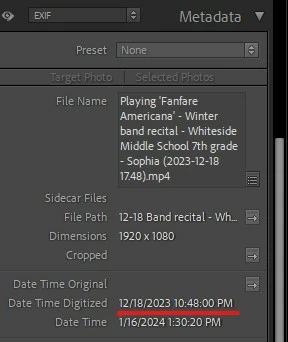
Overall, when I import an MP4 into LR, LR always is consistenly 5 or 6 hours AHEAD of the date/time specified in Windows. If LR is using a value from "Date created", "Date modified", and "Date accessed" (as shown in the screenshot above) then LR is 5 hours ahead. If LR is using a value from "Date" or "Media created" (as shown in the screenshot above), then LR is 6 hours ahead. Since I am in the Chicago CST timezone, 6 hours ahead makes some sense to me because that would be London (possibibly UTC) time.
Anyway, does anyone know how LR determines the date/time of an MP4? If so, is there any strategy for LR to display date/time for MP4 files consistently with Windows?


 AdChoices