
zimlo
Participant
February 12, 2023
Answered

Lightroom Classic Develope Modul

  • February 12, 2023
  • 2 replies
  • 564 views

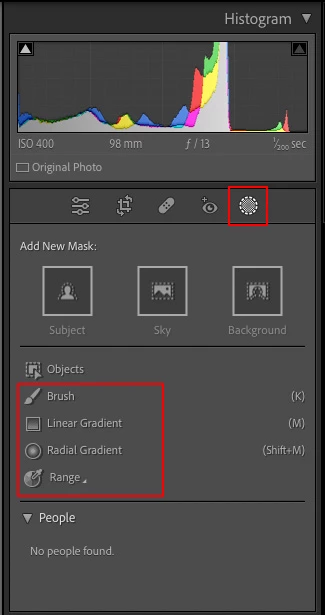
Where do I find the correction brush in the Lightroom development module? Until now, it was always found above the basic settings. I am also missing the gradient filter since the latest version.

Who can help me please?
This topic has been closed for replies.
Correct answer Ian Lyons

You may find attached screenshot helpful as it shows the new icon and how/where the masking tools are displayed.


2 replies

Ian Lyons
Community Expert
Ian LyonsCommunity ExpertCorrect answer
Community Expert
February 12, 2023

You may find attached screenshot helpful as it shows the new icon and how/where the masking tools are displayed.


zimlo
zimloAuthor
Participant
February 15, 2023

Hello Jan Lyons,
thank you very much for your tip.

JohanElzenga
Community Expert
Community Expert
February 12, 2023

They are now all part of Masking. Same place, different icon.


-- Johan W. Elzenga
zimlo
zimloAuthor
Participant
February 15, 2023

Hello Johan W. Elzenga,
thank you very much for your tip.