Inspiring
October 30, 2017
Answered

Lightroom classic doesn't work

  • October 30, 2017
  • 1 reply
  • 1603 views

Hallo Support Team

seit LR classic habe ich folgendes ungelöste Problem

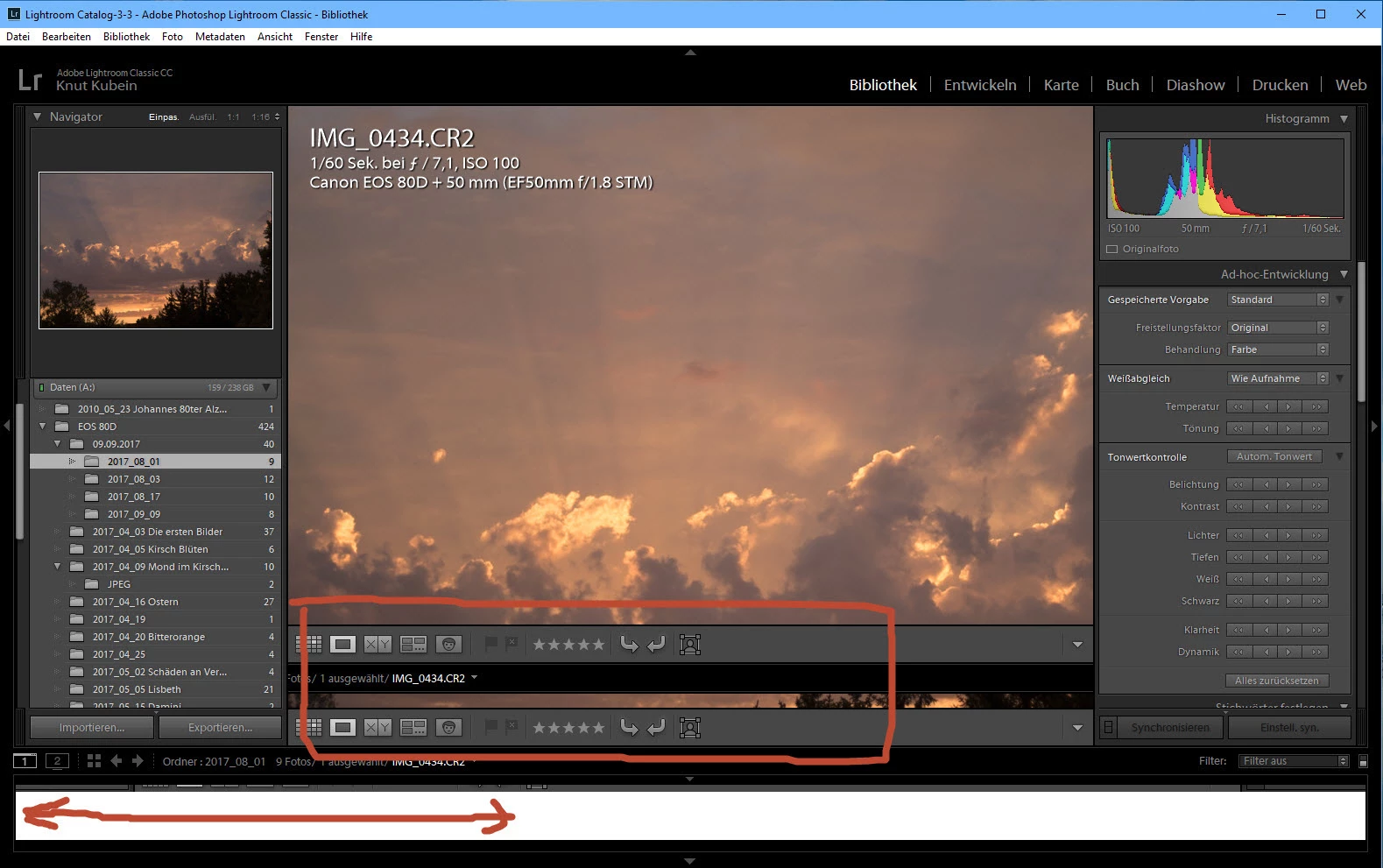
die untere Image Leiste bleibt weis oder schwarz und zeigt keine Bilder.

Wenn ich aber mit der Maus über die Leiste fahre änder sich das obere Bild auf der linken Seite der Oberfläche.

Leider ist LR classic so nicht zu gebrauchen

Btw die Untere Image Leiste wird auch Filmstreifen genannt. Auch F6 einblenden ausblenden Filmstreifen hilft nicht

Window 10 letzter update 1703 Intel core i5 2450M 2,5Ghz 64 Bit

Für jeden Tip dankbar

Knut

This topic has been closed for replies.
Correct answer F. McLion

Habe es probiert hilft leider nicht. Lass es mich mal so erklären

LR classic benötigt zum Starten hochleistung sonst gibt es den 1114

aber später um die Bilder im Filmstreifen anzuzeigen braucht LR classic keine Hochleistung also ohne GPU

Habe das wie folgt überprüft :

Umschaltbare Grafik auf Basierend auf Stromquelle gestellt LR gestartet im Netzbetrieb und dann den stecker gezogen bevor LR ganz oben war

und siehe da die Bilder im Filmstreifen waren da

Also beim Starten Hochleistung sonst 1114 error

aber zum Anzeigen der kleinen Bilder keine Hochleistung man nennt das auch Catch22

Gruß

Knut


Versuch bitte mal noch das:

Try this workaround to see if it works for you. If not, delete the config.lua file afterwards.

  1. Choose Edit > Preferences.
  2. In the Preferences dialog, go the Presets tab.
  3. In the Presets tab, click the Show Lightroom Presets Folder button. The root preset folder opens in the File Explorer.
  4. In the File Explorer, navigate into the Lightroom folder.
  5. Go to the link https://adobe.ly/2hUHGYa and download the config.lua file. Copy the downloaded config.lua file into the Lightroom folder mentioned in the previous step.
  6. Relaunch Lightroom Classic CC.

The System Info dialog (Help > System Info) should display the config.lua flags entry as shown below:

Config.lua-Flags:

AgView.disableDirect2D = true
1 reply

AxelMatt
Community Expert
Community Expert
October 30, 2017
My System: Intel i7-8700K - 64GB RAM - NVidia Geforce RTX 3060 - Windows 11 Pro 25H2 -- LR-Classic 15 - Photoshop 27 - Nik Collection 8 - PureRAW 5 - Topaz Photo
knut88Author
Inspiring
October 30, 2017

Hallo Axel

GPU aus und ein geschaltet bringt keine Aenderung

Preferences hin und hergedreht

alle Katalog Pfade deletet und neu importiert

nothing helps

Gru-

Knut

F. McLion
Community Expert
Community Expert
October 30, 2017
--- Got your issue resolved? Please label the response as 'Correct Answer' to help your fellow community members find a solution to similar problems. ---