Participant
February 9, 2020
Answered

Lightroom Classic erkennt beim Import keine Bilddateien!

  • February 9, 2020
  • 1 reply
  • 817 views

der Rechner ist ein Imac mit macOS Catalina 10.15-3

Lightroom Classic 9.1

Camera Raw 12.1

Egal ob ich meine Canon 6D Mark II an den Rechner anschließe oder die Speicherkarte direkt in den Slot schiebe beim Importdialog werden keine Bilder angezeigt, so als wäre die Karte leer, die Bilder werden nicht erkannt. Ich habe auch versucht die Bilder auf einen USB Stick zu schieben und dann zu importieren, es ist das geleiche: Lightroom sagt es sind keine Dateien vorhanden!

Weiß evt. jemand wo dran es liegen könnte?

Zumal ich nix geändert hatte, bisher hatte ich tausende Bilder importiert und keine Probleme, aber was das nun soll...

Schon mal Danke fürs lesen
This topic has been closed for replies.
Correct answer DdeGannes

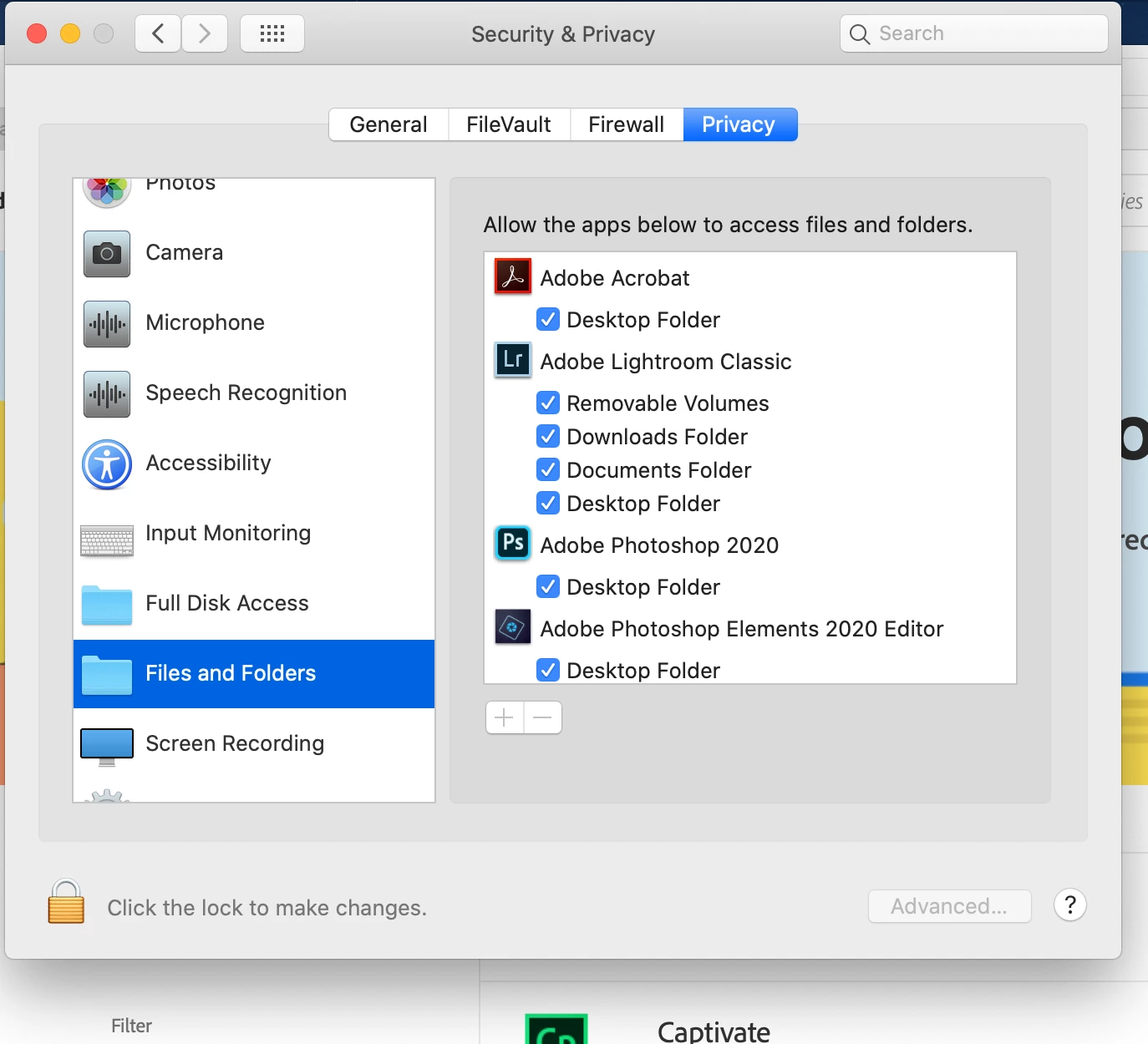
Try the following, Click on the Apple badge > system preferences > security & privacy > files & folders then make sure all the boxes are ticked. See the screen capture.

1 reply

DdeGannes
Community Expert
DdeGannesCommunity ExpertCorrect answer
Community Expert
February 9, 2020

Try the following, Click on the Apple badge > system preferences > security & privacy > files & folders then make sure all the boxes are ticked. See the screen capture.

Regards, Denis: iMac 27” mid-2015, macOS 11.7.10 Big Sur; 2TB SSD, 24 GB Ram, GPU 2 GB; LrC 12.5,; Lr 6.5, PS 24.7,; ACR 15.5,; (also Laptop Win 11, ver 24H2, LrC 15.3; PS 27.0; ) Camera Oly OM-D E-M1.
Participant
February 9, 2020

Hello DdeGannes,

thank you very much for your help. Now everything is fine.

Best regards from Germany.

Klaus