
Participant
November 16, 2023
Question

Lightroom Classic error message when importing presets

  • November 16, 2023
  • 2 replies
  • 720 views

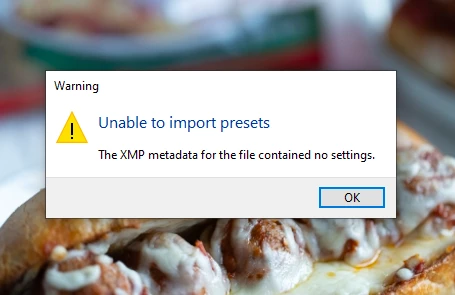
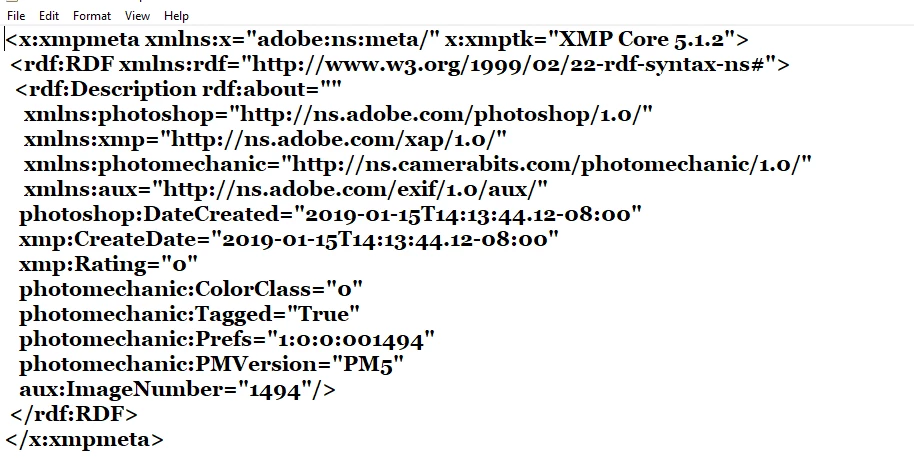
When i try to import preset settings my instructor provided I get the following"The XMP metadata for the file contained no settings"  I'm including the error message and of the file itself...maybe there is something missing in the heading.
This topic has been closed for replies.

2 replies

johnrellis
Legend
November 17, 2023

It looks like that .xmp file was created by Photo Mechanic, and it contains one metadata field that can be interpreted by LR, Rating = 0.  I don't believe Photo Mechanic has the ability to create LR Develop presets.


So you'll need to go back to your instructor to ask if that's the right .xmp file or you if you misinterpreted something.

Participant
November 17, 2023

oh my gosh @johnrellis you are absolutely right!!! my instructor does use photo mechanic and i don't have it installed.  That makes sense, thank you!!


JohanElzenga
Community Expert
Community Expert
November 16, 2023

What kind of file is it and what is it supposed to contain? The metadata do indeed not include any develop settings.


-- Johan W. Elzenga
Participant
November 16, 2023

Hi @JohanElzenga it's suppose to contain color presets for some photos.

JohanElzenga
Community Expert
Community Expert
November 16, 2023

Again: what kind of file is it? It looks like an image, so is it a DNG? If so, then do not use 'Import presets and profiles', but import it as a photo, because that is what it is. Then, if Lightroom shows certain develop settings after the photo has been imported, save those settings as a new preset.


-- Johan W. Elzenga