

Lightroom Classic <external edit in Photoshop> link lost - fix needed
Hi - I am running Lightroom Classic12.4 in Windows 10. My workflow is to develop in Lightroom Classic, then export files into Photoshop, typically as Smart Objects.
My initial problem came after installing Photoshop Beta, as this workflow failed, so I uninstalled Beta, first in Windows and then in Creative Cloud - for good measure. I.E. I HAVE DELETED BETA AND I DO NOT WANT TO GO BACK TO IT!
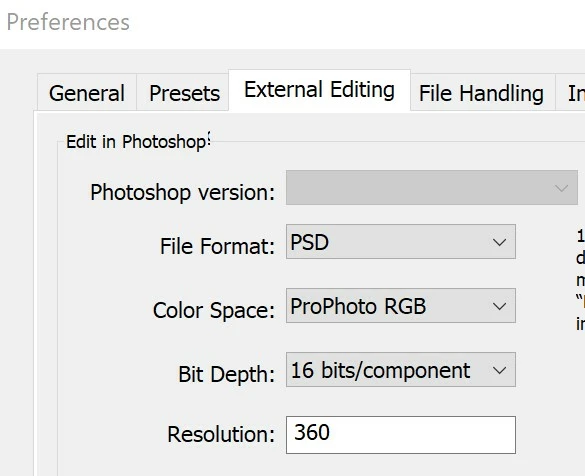
Problem now is that under <Preferences> in Lightroom, the <Edit in Photoshop> has blanked out [SEE SNAPSHOT], instead of returning to Photoshop 2023 24.7, which is what is installed. My temporary workaround was to set Photoshop.exe for Photoshop 2023 as the <Additional External Editor> in <Preferences>, to at least show that the interface at least still worked, although I have since reset this to <not specified>.
To try to fix this, I have un- and reinstalled Lightroom Classic 12.4, selecting <Keep> for settings. The <Edit in Photoshop> is still blanked out.
Before I un- and reinstall Lightroom Classic12.4 with the setting to <Remove> notifications, alerts, interface settings, plugins, and other preferences, I have three questions [1] is this the correct approach to fix this bug or are there any alternatives or other steps needed? [2] Are there any watchouts with removing notifications, alerts, interface settings, plugins, and other preferences in the unistall process? [3] I have not reinstalled Photoshop 2023 24.7, as I assume that this is a Lightroom Classic problem? Again, I do not want to reinstall Beta!!!
Any advice highly appreciated! I am nervous about the uninstall with removed preferences - and digging myself into a deeper hole and still not fixing the bug.
Thanks - Ian
 AdChoices