
Inspiring
October 19, 2017
Answered

Lightroom Classic: Failed to open: CRClient.dll Error 0xc0000020

  • October 19, 2017
  • 32 replies
  • 1983 views
After an upgrade to Lightroom Classic CC, Lightroom failed to open. This error message was received: Lightroom classic CC|CRCclient.dll is either not designed to run on windows or contains an error.... Error status 0xc0000020.
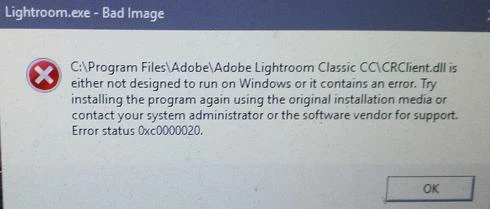
This topic has been closed for replies.
Correct answer Akash Sharma
Hi Kevin,

Please refer this documentation https://helpx.adobe.com/lightroom/kb/bad-image-error-0xc0000020.html and let us know if that helps. 

Thanks, 
Akash Sharma

32 replies

Rikk Flohr_Photography
Community Manager
May 14, 2019
Lightroom Classic 8.3 was released today and contained a fix for this issue. Please update to 8.3 and verify that you are no longer seeing the issue. Thank you!
Rikk Flohr: Adobe Photography Org
Akash Sharma
Akash SharmaCorrect answer
Legend
November 30, 2017
Hi Kevin,

Please refer this documentation https://helpx.adobe.com/lightroom/kb/bad-image-error-0xc0000020.html and let us know if that helps. 

Thanks, 
Akash Sharma
Inspiring
November 25, 2017
I had the same problem. I uninstalled and reinstalled several times. After each reinstall except the last one, Lightroom  Classic ran. After the last uninstall, I have not been able to reinstall, and get a Code 146 Error. I have uninstalled and reinstalled Adobe Creative Cloud Application, have tried to install Lightroom Classic from Adobe.com directly, and have tried the work around for Error Code 146 without success. I am now dead in the water, and have work to do. Maybe I should reinstall my credit card authorization and let Adobe figure out how to get paid.
Inspiring
November 14, 2017
I'm having the same problem with the exact same error message.  I've uninstalled Lightroom twice, and reinstalled it.  Each time the program runs for a while.  I'm using McAffee paid version on windows 10 Creator's Edition.  Agree, it's a nuisance.  Hope this gets fixed soon
Inspiring
November 14, 2017
I hate to say this but my problem is back.  I got the error message when trying to start lightroom.  Now it wont let me delete it as it says I need administrator permission.  I am the administrator.  Not sure what to do.
Inspiring
November 13, 2017
I have had nothing but problems with LR and PS since the upgrade. First, it was PS that would not open. I would get error messages every time. I got onto Adobe help and they remotely took over my computer. Did the disable McAfee uninstall, reinstall all programs thing. This worked for a little while. Then, the only way I could access PS was directly from LR. Then I couldn't get on LR without the same error message shown above. Back to Adobe Help, who again remotely took over my computer. This person found that the Microsoft Visual C++ files were corrupt. After 90 minutes, everything was fixed again. Until the other day, when again I got the error message trying to open LR. Having watched the last remote take over, and repair I kinda knew what to do. So I fixed the Microsoft Visual C++ files...again, uninstalled and reinstalled LR and so far it's still working. Hopefully somebody, somewhere fixes this bug. 
Inspiring
November 10, 2017
I am getting a Crash report as soon as I try to open the program... Was working perfectly yesterday...
Windows 10 machine...
Participating Frequently
November 8, 2017
I just started seeing this error. I have Lightroom Classic CC running on Windows 10 Version 1709. I have been starting Photoshop from Lightroom on this version of Windows for about a week. For example, earlier today I used Lightroom to edit several raw photos. I exported them as jpg from Photoshop. Tonight I copied two new raw photos to my harddrive using File Explorer. I edited the two photos and exported them as png from Lightroom Classic CC. I then decided I wanted to edit the raw photos in PSE. I to start Photoshop CC 2018 from Lightroom. I got the error message described in this thread. I restarted the PC and tried again. Same error. I have not tried the suggestion about McAfee. I will try it tomorrow. It doesn't make sense that McAfee would get in the way of this dll when it has allowed it previously. But then this error suddenly showing up doesn't make sense.
Inspiring
October 26, 2017
We were using it intentionally as a filter for the kids against innappropriate sites. I was thinking of finding another filter or trying to install it again later.
Pete.Green
Community Manager
October 25, 2017
Great to know it's working for you Annie, thanks for letting us know K9filter may have been involved. 

A few questions around K9-- Did you install K9 intentionally? Did you use it as a Parental Control on this computer? Do you still need it?

Regards
Pete