
Participant
December 26, 2024
Question

Lightroom Classic:Fehler in der Katalg-Datei

  • December 26, 2024
  • 1 reply
  • 238 views

Hallo,
ich bin am Verzweifeln: Ich nutze LR seit Jahren und habe einen Katalog mit etwa 90.000 Bilder. In den vergangenen Wochen kam es immer häufiger zu Abstürzen aufgrund von Fehlern im Katalog
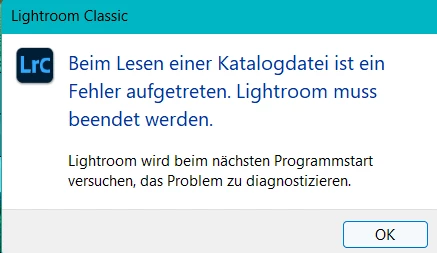
Mittlerweile ist gar kein Arbeiten mehr möglich, da der Fehler immer wieder nach kurzer Zeit auftaucht. Ich habe mittlerweile LR auf einem anderen Rechner installiert, den Katalog auf den neuen Rechner kopiert (Fotos liegen auf einem Server), aber das Problem taucht immer wieder auf. Ich habe noch zwei kleinere Katalog, die laufen einwandfrei. Leider habe ich keine Idee mehr, wie ich den Katalog wieder zum Laufen bringe. Auch bei älteren Backups gibt es immer wieder diesen Katalog-Fehler.

Jemand eine Idee?
LG
Martin


[Moved from ‘Bugs’ to ‘Discussions’ by moderator, according to forum rules.]

This topic has been closed for replies.

1 reply

JohanElzenga
Community Expert
Community Expert
December 26, 2024

Sounds like this catalog is corrupted. What often works is the following: Start Lightroom Classic and create a brand new catalog. Choose 'File - Import from Another Catalog' and select the problem catalog. In the dialog, select to import all images, but do not move them. This will create an exact copy of the old catalog, but usually without the corruption. If this works, then use this as your new catalog and trash the old one. The only thing that will not come across to the new catalog is any publishing service you may have. You'll have to recreate those.


-- Johan W. Elzenga
Participant
December 26, 2024

Thank you very much for your answer.

I have now tried several times to create a new catalog and import the old one. Unfortunately, this does not work, even when I try to install old backups. No matter which old catalog I select, I always get this error message:


dj_paige
Legend
December 26, 2024

Unzip a recent backup to a different physical drive than the catalog is on. Try to open this catalog on the different drive via double-clicking on it.