


Lightroom Classic has been failing to apply Denoise
Hi, my LrC has been failing to complete Denoise on photos this month, and I am looking for solutions. It’s been a great tool for years, and I am unsure where the problem stems from.
When I click the Denoise button in Develop module it seems to start working like it used to, but when the pop-up window is gone the button stays unticked even if I press it (it just goes back unticked immediately)
The system info from LrC
Lightroom Classic version: 14.5.2 [ 202601141538-bad3ef80 ]
License: Creative Cloud
Language setting: en-AU
Operating system: Mac OS 13
Version: 13.7.8 [22H730]
Application architecture: x64
Logical processor count: 8
Processor speed: 2.8GHz
SqLite Version: 3.36.0
Power Source: Plugged In, 58%, Charging
Built-in memory: 16,384.0 MB
Dedicated GPU memory used by Lightroom: 758.1MB / 2,048.0MB (37%)
Real memory available to Lightroom: 16,384.0 MB
Real memory used by Lightroom: 1,280.5 MB (7.8%)
Virtual memory used by Lightroom: 42,896.3 MB
Memory cache size: 192.8MB
Internal Camera Raw version: 17.5 [ 2318 ]
Maximum thread count used by Camera Raw: 5
Camera Raw SIMD optimization: SSE2,AVX,AVX2
Camera Raw virtual memory: 367MB / 8191MB (4%)
Camera Raw real memory: 455MB / 16384MB (2%)
Cache1:
Final1- RAM:302.0MB, VRAM:105.0MB, A9_00289.ARW
NT- RAM:302.0MB, VRAM:105.0MB, Combined:407.0MB
Cache2:
m:192.8MB, n:189.4MB
U-main: 94.0MB
Standard Preview Size: 3360 pixels
Displays: 1) 3360x2100, 2) 1600x900
Graphics Processor Info:
Metal: AMD Radeon Pro 555
Init State: GPU for Display supported by default with image processing and export supported in the custom mode
User Preference: GPU for Image Processing Enabled
Enable HDR in Library: ON
GPU for Preview Generation: Auto (S4_2)
Application folder: /Applications/Adobe Lightroom Classic
Library Path: /Volumes/NINJA2/Charlene's wedding/Charlene's wedding/Charlene's wedding.lrcat
Settings Folder: /Users/yostan/Library/Application Support/Adobe/Lightroom
Installed Plugins:
1) AdobeStock
2) Aperture/iPhoto Importer Plug-in
3) FireCull
4) Flickr
Config.lua flags:
My MacBook Pro is 15-inch 2017.
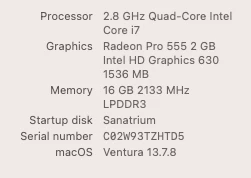
I can’t determine the cause, so any advice or suggestion is welcome. Thanks
 AdChoices