
Inspiring
October 12, 2025
Answered

Lightroom Classic has detected interoperability issues with Adobe Photoshop 2025. [SOLVED]

  • October 12, 2025
  • 1 reply
  • 234 views

When trying to edit an image from within Lightroom Classic to Photoshop 2025 I am getting this message:
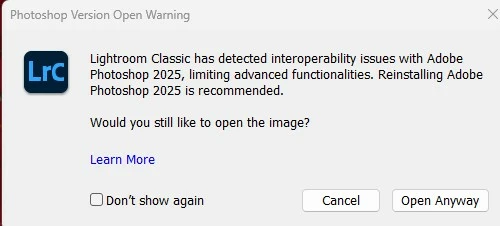
When i click on Learn More in the error message it is telling me to re-install Adobe Photoshop 2025.  How do I re-install it?

Correct answer tonymuffin

Re-installing Adobe Photoshop 2025 solved the issue.

1 reply

johnrellis
Legend
October 12, 2025

Go to the Adobe Creative Cloud desktop app. Click the Apps button in the left column. In the list of Installed Apps in the right column, hover the mouse over Photoshop until the hidden three-dot menu "..." appears. Click the three dots and then Uninstall. Repeat for all versions of Photoshop you might have installed. Then in the middle of the window, find Photoshop and click Install.

tonymuffinAuthorCorrect answer
Inspiring
October 20, 2025

Re-installing Adobe Photoshop 2025 solved the issue.