
Participant
April 18, 2022
Question

Lightroom classic hungs up all the time

  • April 18, 2022
  • 2 replies
  • 334 views

System: Windows 10  21H2  Build 19044.1645

Lightroom Classics 11.3


Since the last Update, I performed yesterday I got this new very annoying behavior:


Occassionally after doing some changes to a picture, the busy animation in the bottom right is circeling around forevor and never ends with that:
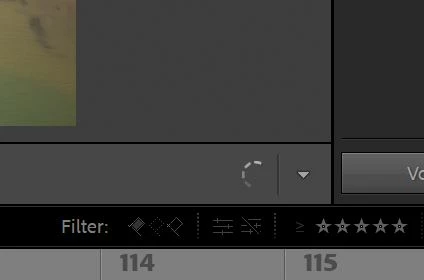


When I click on an other image it doesn't load.

The only way to fix it is to close LR and start again.


I already tried to deinstall and install it again, but this didnt solve the problem.

What can I do?

This topic has been closed for replies.

2 replies

bobd650
Participant
April 18, 2022

Hi,  I had the same problem.  Ashish at Adobe support, rolled back my LR CC version to previous, and all is fine again. Whew!

Community Expert
April 18, 2022

The first thing that you should try is to switch off the GPU support from the Lightroom preferences and check if that helps to fix the issue.

Go to Lightroom > Preferences > Performance tab > Uncheck "Use Graphics Processor" > Restart Lightroom.

https://helpx.adobe.com/lightroom-classic/kb/lightroom-gpu-faq.html#troubleshooting

https://helpx.adobe.com/lightroom-classic/kb/troubleshoot-gpu.html


If Lightroom doesn't start correctly the please see "Solution 2" in the document behind the second link.

Troubleshoot GPU issues | Lightroom Classic (adobe.com)


Another step is to try to reset the Lightroom preferences.

https://www.lightroomqueen.com/how-do-i-reset-lightrooms-preferences/

It's recommended to backup your preferences before you reset the preferences to the default settings: 

https://helpx.adobe.com/lightroom-classic/kb/preference-file-and-other-file-locations.html


Do you get an error message? If yes, please post the exact message or an screenshot.

My System: Intel i7-8700K - 64GB RAM - NVidia Geforce RTX 3060 - Windows 11 Pro 25H2 -- LR-Classic 15 - Photoshop 27 - Nik Collection 9 - PureRAW 6 - Topaz Photo AI
Participant
April 18, 2022

Dear all!


I have the same issue! I´ve tryed all steps at https://helpx.adobe.com/br/lightroom-classic/kb/troubleshoot-gpu.html and https://helpx.adobe.com/lightroom-classic/kb/crash-gpu-directx-enabled.html, except desable the Graphic Processor, because I can't open LR Classic.

Turn off the Use Graphics Processor option.

  1. In Lightroom Classic, choose Edit > Preferences
  2. In the Preferences dialog, click the Performance tab.
  3. Deselect Use Graphics Processor.
  4. Relaunch Lightroom Classic.

Intel UHD Graphics 630 + NVidia Gforce GTX 1050 Ti
LR Classic 11.3 updated 6 days ago.


Participant
April 18, 2022

Same issue here. Since Lightroom Classic auto-updated to 11.3 last week, I get the Unexpected Error dialogue and can't get into my current catalogue. Help Adobe!