Participant
April 8, 2020
Question

Lightroom Classic icon in taskbar for Windows 10 is blank
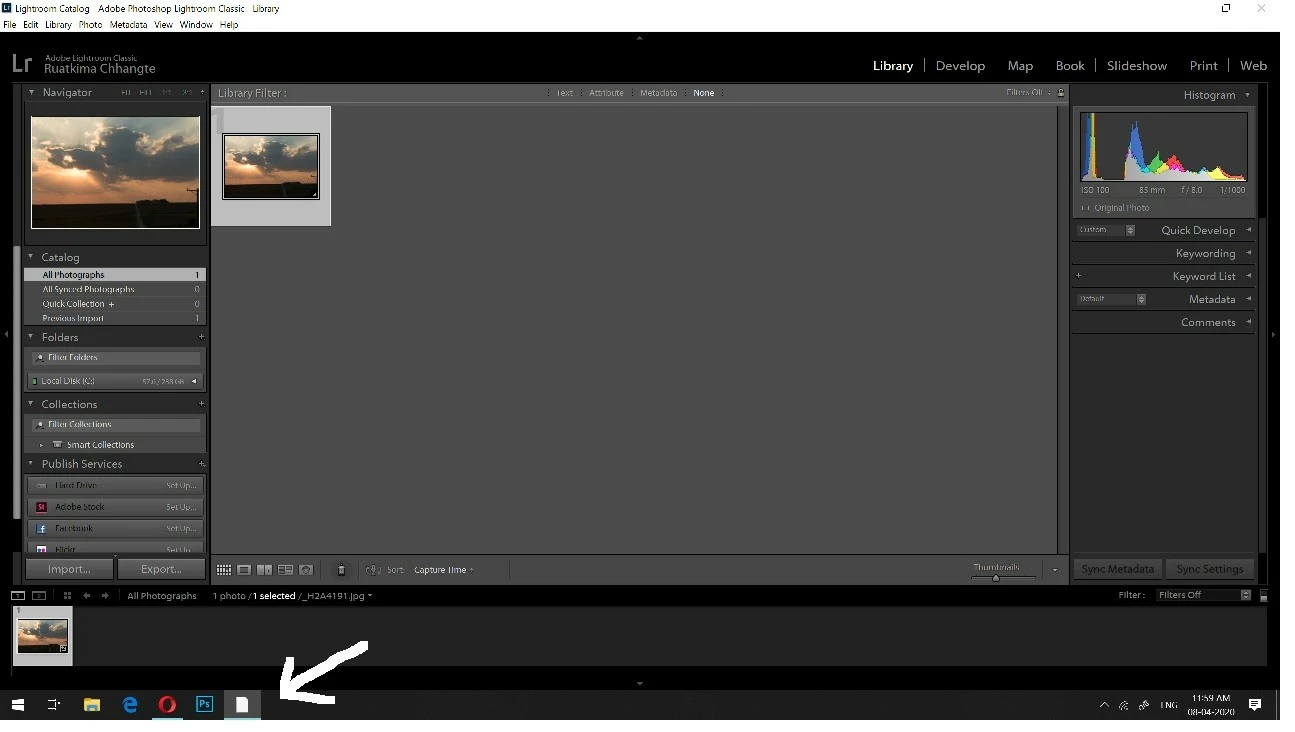
  • April 8, 2020
  • 2 replies
  • 2538 views

my lightroom icon in taskbar is blank,i tried deleting and reinstalling but its still the same.can you please help?


{Thread title edited by moderator}

This topic has been closed for replies.

2 replies

Participant
December 27, 2020

I have this same problem right now.  It's driving me nuts.

  • Windows 10 Home version 2004
  • Lightroom Classic version 10.1
  • Adobe Plan  - Photography Plan
  • Home-built i7 8700
  • 32 GB of RAM
  • AMD Radeon RX 570 GPU 4 GB RAM
  • GPU driver version 20.12.1

The icon that shows up is the one next to the Chrome icon in the taskbar.


GoldingD
Legend
December 27, 2020

I have had issues in the past with Adobe updates not replacing the shortcut in the taskbar. Annoying. 


Delete/remove the failed shortcut in the taskbar.

If you have a shortcut icon on the desktop, drag it into the taskbar.

If not, create a shortcut.


https://www.digitalcitizen.life/how-pin-special-windows-shortcuts-taskbar/


Participant
December 29, 2020

Thanks.  I tried this, but it doesn't work.  I may have to go through the icon cache deletion routine.  Happy New Year!

nikunj.m
Legend
April 8, 2020

Hi there,


The issue seems to be with the icon cache for Windows 10. Please check the steps mentioned here: https://answers.microsoft.com/en-us/windows/forum/windows_7-desktop/some-taskbar-icons-are-blank-sheets/fede67d8-0234-48c6-aa71-5a1503d6eaa0


Though the mentioned steps are for Windows 7 but may help with your issue. Let us know if it works.


Regards,

Nikunj

JBedfordPhoto
Inspiring
July 5, 2020

I have the same problem and this doesn't work for me. Lightroom Classic CC is the only icon affected by this. Strangely, it also doesn't show up in my Start Menu, even after right-clicking the desktop shortcut and requesting that it be 'pinned to start'. All my recent catalogs are represented by white icons too and, according to the notification that appears when clicking to open them, "appear to be missing". 


This has been a problem for me for the past 6 months at least.


GoldingD
Legend
July 5, 2020

Your problem looks more serious. Looks like a different problem.


Please post your own problem


When you do, list some additional info


  • Operating System version and build (Windows 10 v1909 build 18363?) (via Windows Settings/System/About)  Or is this a MAC?
  • Lightroom Classic version, actual number (V9.3?)
  • Adobe Plan (Photography Plan?)
  • Computer make/model
  • Amount of RAM
  • GPU make/model
  • GPU driver version (looks like you have NVIDIA, so using the NVIDIA utility app called GeForce Experience, will provide that, check for an update while you are at that, and if an update exists, when installing select Custom for install type as to cause a clean install) hmm, but if a MAC?


One oddity that sticks out. In that screenshot I see an icon for Lightroom Classic, using the letters LrC, Ok, that is the current icon. BUT, why to the right is the text stating the app name Lightroom Classic CC. Should not have CC on it.