
RobAllen_19FT
Participating Frequently
November 25, 2019
Question

Lightroom Classic import has many Macintosh HDs

  • November 25, 2019
  • 3 replies
  • 445 views

On my brand new MacBook Pro 16" which shipped with macOS Catalina, when I open the import screen in Lightroom Classic, I get a long list of "Macintosh HD" items.
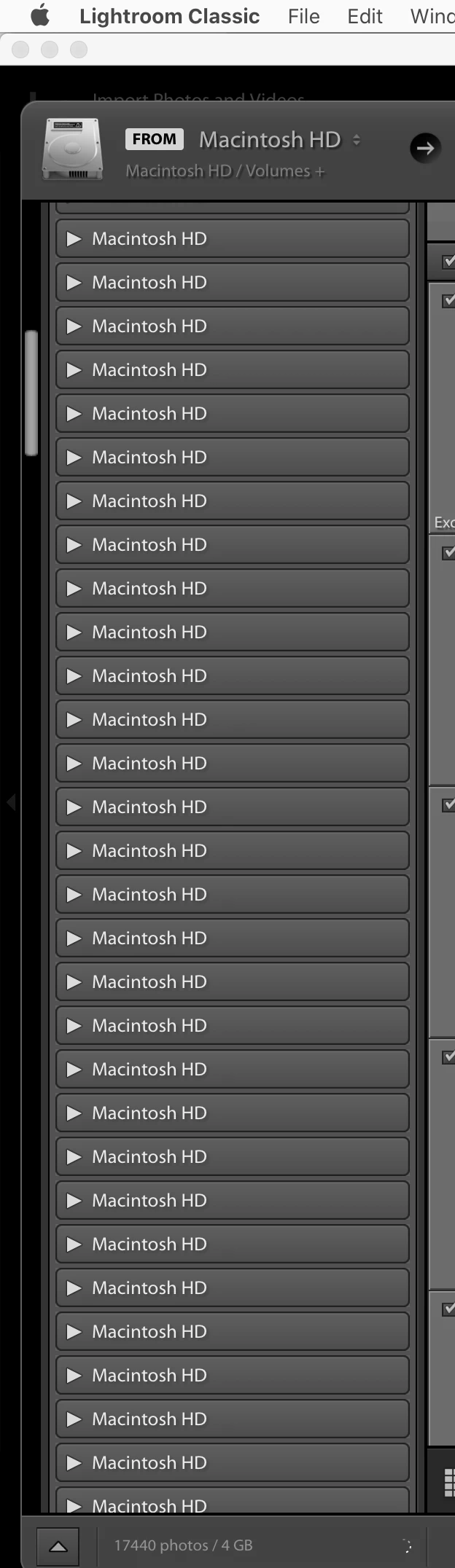


How do I fix it?

This topic has been closed for replies.

3 replies

Ian Lyons
Community Expert
Community Expert
November 25, 2019

The issue has been around since before Catlina (previously the disks names were in hexadecimal) and Adobe are aware of it. 

Legend
November 25, 2019

Apple changed how volumes work and where the mount point is. I suspect that Lightroom will need to be updated to support this.

RobAllen_19FT
Participating Frequently
November 26, 2019

Thanks. I hope they solve it soon!


I would have thought that with all of Adobe's resources, the 5 months notice that they got from Apple that Catalina was coming would have been enough time for them to have fixed it before Catalina released.

RobAllen_19FT
Participating Frequently
November 25, 2019

A rough and ready count shows that I have approximately 310 of these "Macintosh HD" entries…