
rastogiatul
Participant
October 1, 2022
Answered

Lightroom Classic Import Issues
  • October 1, 2022
  • 1 reply
  • 159 views

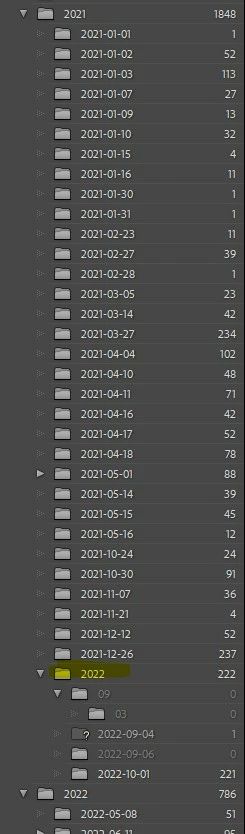
 I am using lightroom classic, latest version on Windows 11 PC. I  use yyyy-mm-dd folder structure to import my picutres. For some reason lightroom is now creating 2022 year foler under 2021 year and importing photos to day folder under the year 2022. How can I fix this error. 


[moved to discussions from bugs section - mod.]

This topic has been closed for replies.
Correct answer Jim Wilde

It looks like you have selected the 2021 year folder as the target folder in the Destination panel. If that's the case you need to change the target folder to be the parent folder above all of the year folders.


You can correct the problem with those few 2022 sub-folders using the Folders Panel, by dragging them out of the "wrong" 2022 folder and dropping them on the correct 2022 folder.

1 reply

Jim Wilde
Community Expert
Jim WildeCommunity ExpertCorrect answer
Community Expert
October 1, 2022

It looks like you have selected the 2021 year folder as the target folder in the Destination panel. If that's the case you need to change the target folder to be the parent folder above all of the year folders.


You can correct the problem with those few 2022 sub-folders using the Folders Panel, by dragging them out of the "wrong" 2022 folder and dropping them on the correct 2022 folder.