
Lightroom Classic - Imported Files not visible in Folders
After importing three large files of raw images, I noticed that the files were not visible in the Folders section. This was a considerable surprise ,as I've been using Lr for 15 years plus and never experienced this before.
I thought that I had done something wrong and tried to import the files again.
This was not possible as the Lr import window showed the file images (stored on my Mac) , but these swiftly greyed out prior to hitting the import tab.
Under normal circumstances, this would suggest to me that the files have already been imported and in the catalogue.
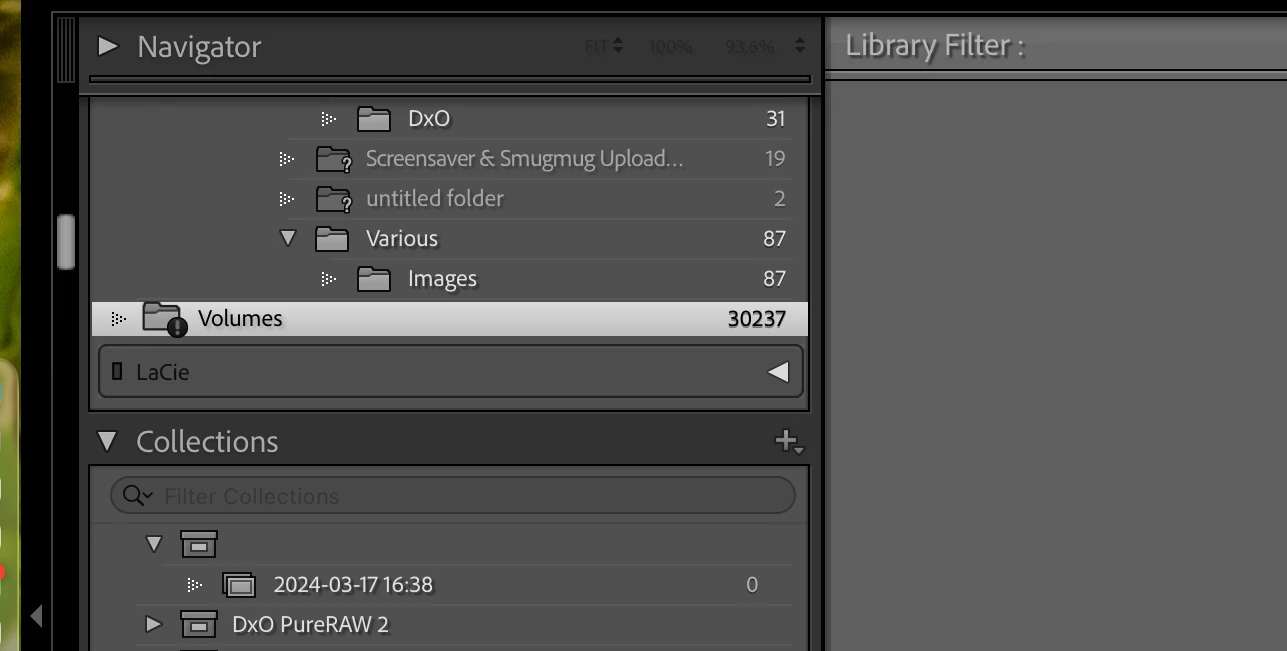
There is however a folder called Volumes at the bottom of the folder window (see screenshot) with an exclamation mark in it, which holds 30,237 images .
Could this possibly be the three large files I am looking for?
As you can see, the right facing triangle is greyed out , hence making it impossible to open to see the subfolders .
Does anyone know how to open this file please or is there another cause of this issue ?
If so, any guidance on how to correct it would be very much appreciated .
MacBook Pro M1
Tahoe 26.5.2
Lightroom Classic Version 15.4.1


 AdChoices