



Ignacio74
Participating Frequently
Nov 5, 2026 12:43 PM UTC
Question

Lightroom Classic is not using the GPU to export

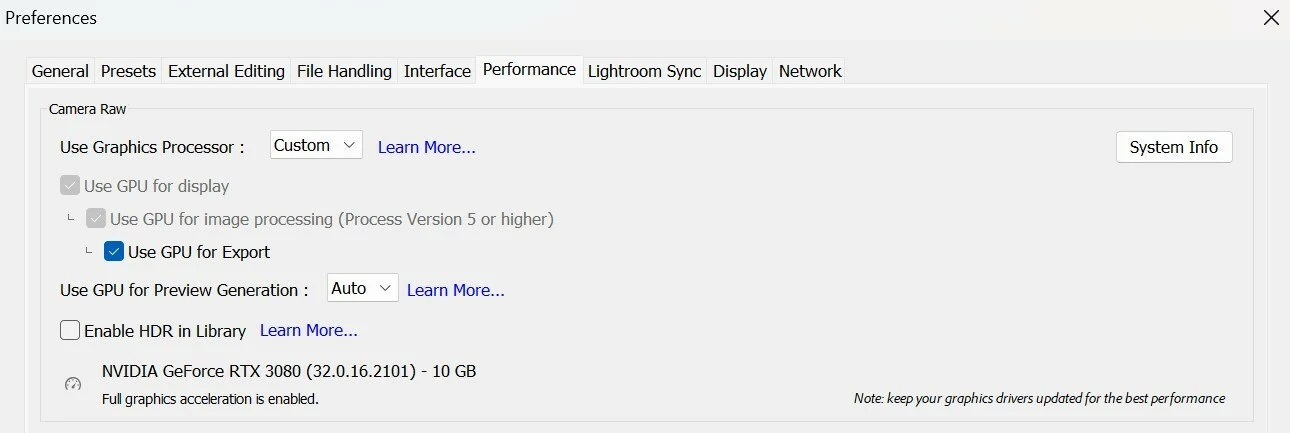
Although my computer meets the requirements described on the software's help page and the option is enabled, LRC is not using the GPU during the image export process.

https://helpx.adobe.com/lightroom-classic/desktop/technical-support/technical-issues/gpu-issues/lightroom-gpu-faq.html#gpu-for-image-processing

As you can see in the attached screenshot, I have an NVIDIA RTX 3080 graphics card with 10GB of VRAM. I have the software updated to the latest version, and the graphics card drivers are also up to date.

Other processes, such as image processing, do utilize the GPU as the primary processor, which confirms that the card is functioning perfectly.


    7 replies

    johnrellis
    Legend
    Nov 8, 2026 2:56 AM UTC

    DirectX: NVIDIA GeForce RTX 3080 (32.0.16.2101)


    That driver (621.01) is a Game Ready driver from 10/21/26. Nvidia and Adobe recommend using Studio drivers, which are tested specifically for creative apps like LR. You can download the latest Studio driver (621.14, 11/4/26) from here:

    https://www.nvidia.com/en-us/drivers/details/283966/

    Translate
    Ignacio74
    Ignacio74Author
    Participating Frequently
    Nov 8, 2026 11:43 AM UTC

    The specifications for Game Ready and Studio drivers are the same for version 621.01. In this version, there are no differences; they are identical.

    Translate
    johnrellis
    Legend
    Nov 8, 2026 6:28 PM UTC

    [View this post in your web browser. It contains formatting and images that don't appear in email.]

    ​@Ignacio74 The specifications for Game Ready and Studio drivers are the same for version 621.01. In this version, there are no differences; they are identical.


    The Nvidia website shows that 621.01 is a Game Ready driver only, while 612.14 is both a Game Ready and Studio driver. In your case, the driver version doesn’t seem to be the issue, but in a fair number of cases, updating to the latest Studio driver fixes things.


    Translate
    CORCTON34033231
    Community Expert
    Community Expert
    Nov 5, 2026 3:09 PM UTC

    Hi Ignacio,


    Your RTX 3080 with 10 GB VRAM meets the requirement in the official GPU FAQ: GPU for Export needs a minimum of 2 GB GPU RAM, and 8 GB of dedicated GPU RAM is recommended. The same FAQ also notes that Lightroom Classic runs a test on the graphics card at launch, and if that test fails the card is disabled even if it meets the minimum requirements, and to walk through the troubleshooting steps.


    Please work through the official troubleshooting steps in this order, from "Troubleshoot graphics processor (GPU) and graphics driver issues | Lightroom Classic":


    1. Confirm you are using the latest version of Lightroom Classic (Help > Updates).

    2. Confirm your graphics card is compatible with Lightroom Classic.

    3. Update your graphics card driver directly from NVIDIA's website — the doc notes Windows Update will not always give you the latest driver.

    4. Perform a clean installation of the graphics card driver, removing all previous versions first, following NVIDIA's clean-install instructions linked in the doc.

    5. Disable third-party graphics accelerators / GPU overclocking utilities.

    6. If you use more than one graphics card, set the high-performance NVIDIA card as the preferred graphics processor for Lightroom (NVIDIA Control Panel > Manage 3D settings > Program Settings), or remove/disable the less powerful card.

    7. Do not run Lightroom Classic on a virtual machine — the doc says GPU features are not tested or officially supported there.


    After those steps, relaunch Lightroom Classic and re-enable Use Graphics Processor in Edit > Preferences > Performance.


    Official docs:

    - https://helpx.adobe.com/lightroom-classic/desktop/technical-support/technical-issues/gpu-issues/troubleshoot-gpu.html

    - https://helpx.adobe.com/lightroom-classic/desktop/technical-support/technical-issues/gpu-issues/lightroom-gpu-faq.html#gpu-for-image-processing


    Could you also share your exact Lightroom Classic version and Windows version, and what Help > System Info shows under Graphics Processor Info? That will show whether Lightroom Classic is still detecting the RTX 3080 after the steps above.

    Translate
    Ignacio74
    Ignacio74Author
    Participating Frequently
    Nov 5, 2026 3:40 PM UTC

    Hello,
    thank you for the quick response.

    I have verified all the steps you described in "Troubleshoot graphics processor (GPU) and graphics driver issues | Lightroom Classic," and everything appears to be correct.

    I have the latest version of LrC (version 15.6, from September 2026) installed.
    The graphics card is compatible with LrC, and its drivers are up to date, installed via the official Nvidia app following a clean installation.
    There are no other graphics cards installed in the system, and I am not running LrC through a virtual machine.

    My version of Windows is up to date (Windows 11 Pro 26H2) with all patches installed (26300.9818).

    The "Help > System Info > Graphics Processor" section shows the following information:

    DirectX: NVIDIA GeForce RTX 3080 (32.0.16.2101)
    Init State: GPU for Export supported by default
    User Preference: GPU for Export enabled
    Enable HDR in Library: OFF
    GPU for Preview Generation: Auto (S5_9)


    Translate