
Participant
September 8, 2022
Question

Lightroom Classic issue with Graphics drivers (Upgrade driver error message)

  • September 8, 2022
  • 1 reply
  • 357 views

Today Ltr gives me this notice. I tried to install the recommended driver but failed due to some permissions from my HP. How can I solve? Tx
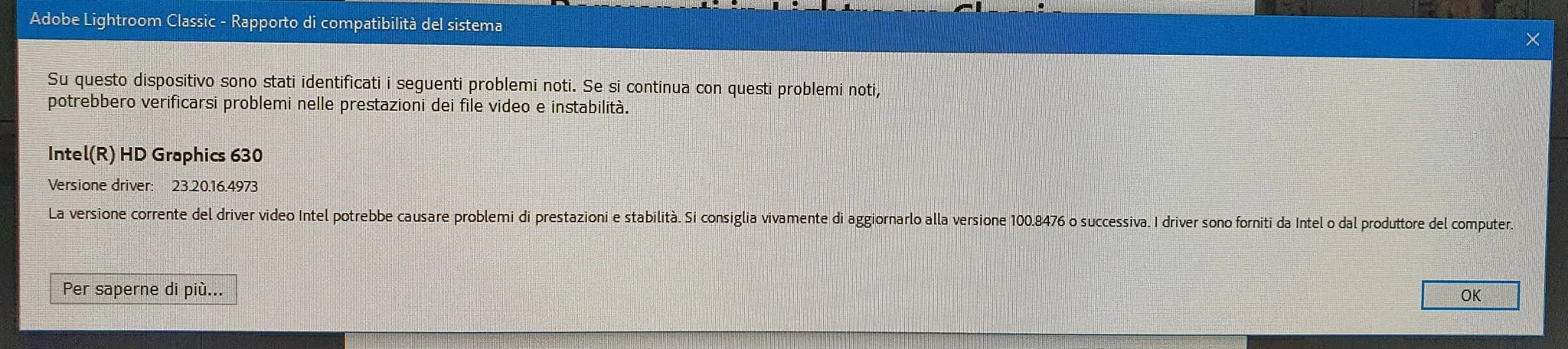


{Title edited by Moderator}

This topic has been closed for replies.

1 reply

Ranjisha Sengupta
Legend
September 9, 2022

Hi there,


Thanks for reaching out. Which version of Lightroom Classic and Windows are you using? 

Are you using multiple graphics cards? How are you trying to install the drivers? Please check the detailed steps in the following article on graphics processor troubleshooting: https://helpx.adobe.com/lightroom-classic/kb/troubleshoot-gpu.html.

Try them and let us know if it works.


Thanks,
Ranjisha

Participant
September 9, 2022

Hi there,

I am using Ltr C in the latest version 2.5 and I have windows 10. I have 2 graphics cards: Intel(R) HD Graphics 630 and NVIDIA GeForce GTX 1050. I tried to install the drivers recommended by the notification but I could not complete it due to permissions problems related to HP it seems. Thanks for answering me

F. McLion
Community Expert
Community Expert
September 9, 2022

There is no LrC version 2.5.

You should set up LrC to use the GTX 1050 since this card is more powerful than the HD630 - use the Nvidia control panel for this.

Use the Intel page to download the latest HD630 driver and the Nvidia page to download the latest GTX1050 driver - do not rely on MS update.

You need to have administrative privileges to install drivers - permission is yours, not HP issue.

--- Got your issue resolved? Please label the response as 'Correct Answer' to help your fellow community members find a solution to similar problems. ---