
Known Participant
July 29, 2026
Question

Lightroom Classic JF flickr public service is not working, all pictures is goon

  • July 29, 2026
  • 14 replies
  • 109 views

I had to create a new catalog and reimport all my photos. By importing from a previous catalog I got my collections back but not the publishing services like JF Flickr and Adobe stock. I have reinstalled JF Flickr, reauthorized in Flickr, without results. Can anyone help?
    14 replies

    Known Participant
    August 4, 2026

    Thanks again! Problem to go furher on with that is that the Pug in extra for JF Flickr is grey (Flickr is aktiv) and not aktiv, so I had to imported the preset again a guess. I have found out that I have to go to Preferences and preset, But I dont no howe to go further on there.  Trying to figurat.  If you now,      

    dj_paige
    Legend
    August 4, 2026

    You have to go into the Lightroom Classic plug-in manager and enable the plug-in.

    Known Participant
    August 5, 2026

    Sorry to bother you again with this. I have enable JF Flickr. I dont understand howe I kan get the grey text, JF Flickr, to turn upp to be black in Plug in extra. If you understand what I mean. Regards

    Known Participant
    August 2, 2026

    Thanks I will try that. Great, give me some hope.  Mayby is best to do that when I have my harddrive connected,  on travel just now. Thanks again

    Known Participant
    August 2, 2026

    Sending some pictures

    dj_paige
    Legend
    August 2, 2026

    I explained you want to associate the images in your LrC catalog automatically with images in Flickr. It seems you have not done that.

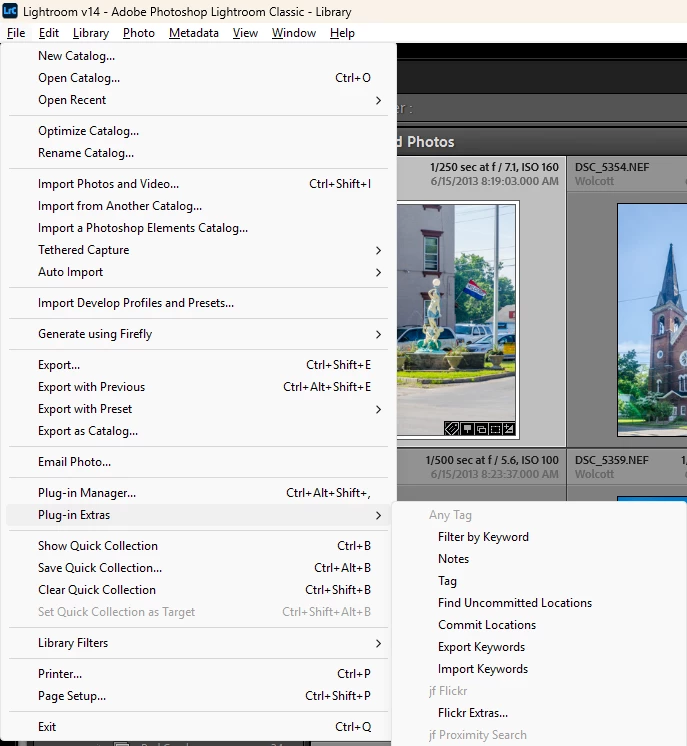
    Under the File Menu, select Plug in Extras and then under jf Flickr select Flickr Extras …


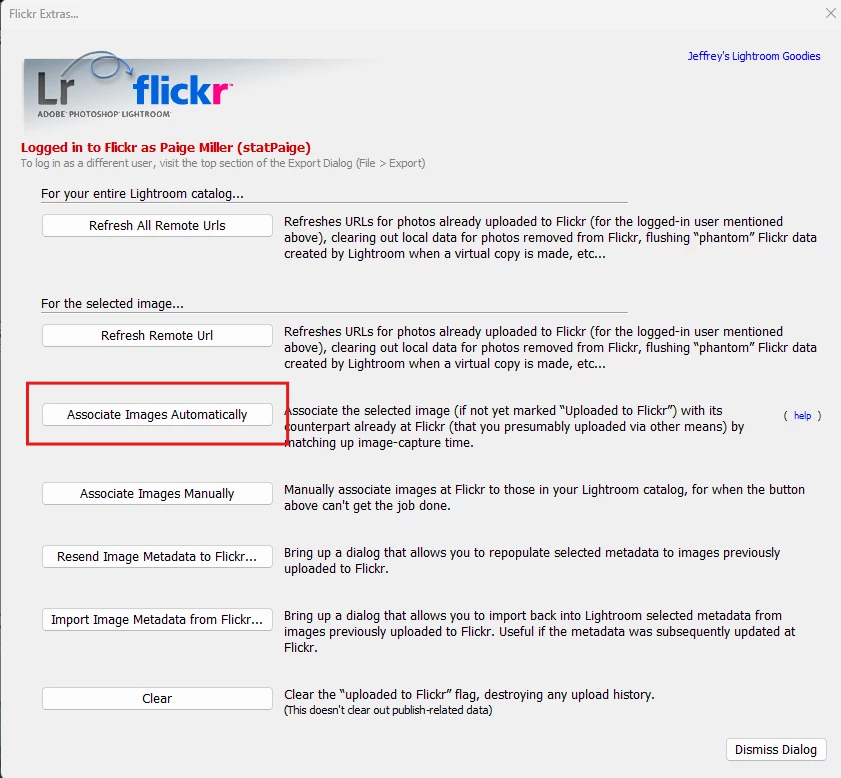
    Then click on Associate Images Automatically


    Known Participant
    August 2, 2026

    Refresh user data and reauthenticate to Flickr. Have also tried remove J Flickr and add  it again. I saw now that in Plug in extras the Jf Flickr was grey.  So when I tried to refresh all remote Urls it was on Flickr, and not JF Flickr.  There is some step here that I dont understand. Regards

    Known Participant
    August 2, 2026

    Excuse me. After I created a new catalog and imported all images, collections and all publishing services were missing. After importing from an older catalog, I got back my collection, but not the publishing services for Adobe and JF Flickr. I have tried re-authorizing via Flickr and most recently in Flickr Extra, where I clicked "Refresh Real Remote." Still i can't see any pictures coming up.  Under JF Flickr it's 0 pictures.  Shell I post other details? Regards


    dj_paige
    Legend
    August 2, 2026

    Excuse me. After I created a new catalog and imported all images, collections and all publishing services were missing. After importing from an older catalog, I got back my collection, but not the publishing services for Adobe and JF Flickr. I have tried re-authorizing via Flickr and most recently in Flickr Extra, where I clicked "Refresh Real Remote." Still i can't see any pictures coming up.  Under JF Flickr it's 0 pictures.  Shell I post other details? Regards


    What command did you try to get the images to be recognized by jf Flickr?

    dj_paige
    Legend
    July 29, 2026

    In the jf Flickr plugin, there is an option to automatically associate the photos in your catalog with the photos on Flickr. I do not know the exact wording of this option, but I’m sure you can find it.

    Known Participant
    July 29, 2026

    Thanks a lot, I will check. Regards


    Known Participant
    August 2, 2026

    Hi again! Sadly it dident work. Does anyone else know if there’s is other solutions? Writing to Jeffrey probably won’t pay off.