
Participant
September 1, 2025
Answered

Lightroom Classic, Lens Correction, FujiFilm

  • September 1, 2025
  • 1 reply
  • 254 views

Hi, I’m using the latest desktop version of Lightroom. My camera, the Fujifilm X-T2, is supported in Camera Raw. However, when I go to Lens Corrections → Enable Profile Corrections and select Fujifilm, I don’t see the option for the Fuji X-T2. Why isn’t this camera available in the list, and how can I apply the correct lens profile?
Correct answer Per Berntsen

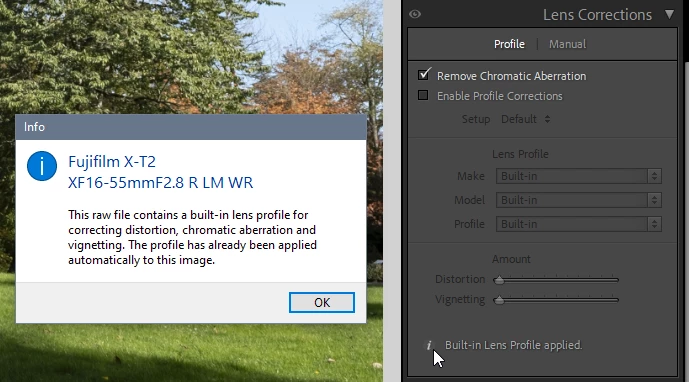
Lens corrections for photos taken with this camera are written to the raw files, and applied automatically by LrC.

I downloaded a sample file to verify it.

This is also the case for my Fuji GFX 50S, and I think it applies to most Fuji cameras when using native lenses.


1 reply

Community Manager
September 1, 2025

Hi @anitalucic, welcome to the community!

Just to clarify, the Fujifilm X-T2 is a camera body, not a lens. The lens model you're using will be different from the camera model. Could you let us know which lens you're using? You can check supported lenses for Lens Correction here: https://adobe.ly/47o70jB

Hope this helps!
Alek

*(If you mention me with an @, like @Aleke, I’ll get a notification and can respond faster.)*
Per Berntsen
Community Expert
Per BerntsenCommunity ExpertCorrect answer
Community Expert
September 1, 2025

Lens corrections for photos taken with this camera are written to the raw files, and applied automatically by LrC.

I downloaded a sample file to verify it.

This is also the case for my Fuji GFX 50S, and I think it applies to most Fuji cameras when using native lenses.


Participant
September 2, 2025

Thank you for clarifying! Will take a look. Much appreciated indeed.