Participant
June 16, 2023
Question

Lightroom Classic Limiting folders at 717(?)

  • June 16, 2023
  • 2 replies
  • 215 views

I'm on an M1 max mac.


I'm importing photos from a wedding. There are 2037 images split between two folders (according to Finder and the import dialogue in Lightroom). However my Lightroom Classic CC import is limiting the two folders at 717 each.

There are 510 photos missing in my lightroom, but avilable in finder.

I've uninstalled and reinstalled Lightroom. I've deleted the photos from the catalog and re-imported. I've restarted my computer. I've uninstalled and reinstalled Lightroom again. I've broken each folder out into separate folders, thinking if each folder had less than 717 it would work. Didn't work. I then took all of these separated folders out into a separate root folder and imported anew. Didn't work.

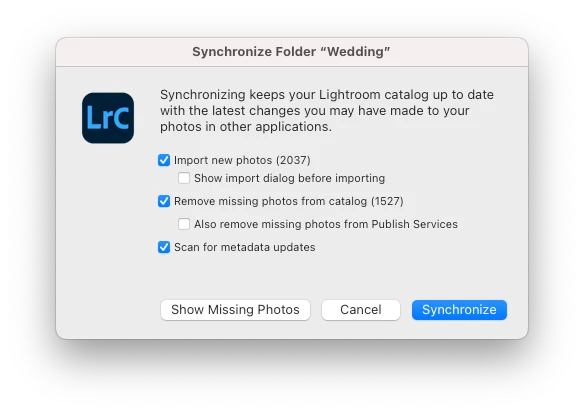
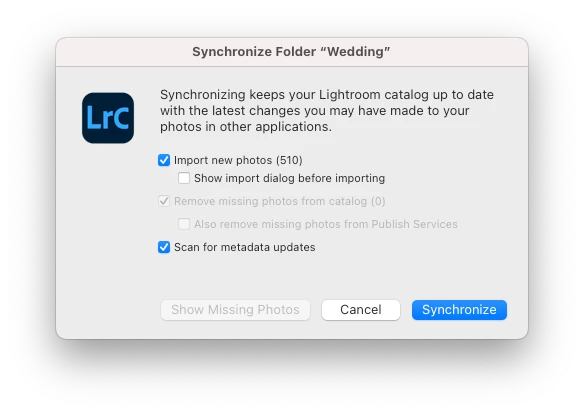
When I go to "sync" the folders it alerts me that it will add 510 new photos, but when it goes through the motions it says "no photos were found to import"

I'm hoping someone has experienced this and came up with a solution or hoping someone can point me in the right direction.

I'm also worried there have been other weddings like this and I just never realized...
This topic has been closed for replies.

2 replies

JohanElzenga
Community Expert
Community Expert
June 19, 2023

Check the option to show the import dialog. That might give you a clue. Could it be that some of these photos are JPEGs and have the same file name as other files (RAW or TIFF or DNG)? If so, then make sure that you have selected the option to treat JPEGs next to raw files as separate photos in the preferences. Lightroom will also consider JPEGs that have the same name as TIFFs as sidecar files of these TIFFs!


-- Johan W. Elzenga
Participant
June 19, 2023

Thanks Johan! I'll attempt this as soon as I'm able to and report back! Likely tomorrow.

Rob_Cullen
Community Expert
Community Expert
June 16, 2023

I would be more concerned about the number of 'Missing' files reported in the Synchronize dialog! -1527

I suggest you should fix the 'Missing' photos first as [Synchronize Folder] can have major consequences if this option to 'Remove....' is checked.  Dangers of Synchronize Folder 


And I would be using the standard [Import] function to Import files that are NOT already in the catalog. But here again- 'Missing' photos ARE in the Catalog (just not in a location, or named, as LrC expects) and will not import a second time.


Regards. My System: Windows-11, Lightroom-Classic 15.1.1, Photoshop 27.3.1, ACR 18.1.1, Lightroom 9.0, Lr-iOS 10.4.0, Bridge 16.0.2 .
Participant
June 19, 2023

Hey Rob! Thanks for taking the time to respond.

The 1527 missing photos are from when I moved all of the photos to their own root folders, effectively making them lost. The second dialogue that says "add 510 new photos" is where I'm at most recently.

I think we're on the same page, but for clarity, the reason I am using the sync folder function is because the 510 photos did not import when I added them to the catalog in the first place. Or at least they did not come in to the catalog in a way that I can view/access them readily.