
Participant
July 22, 2026
Question

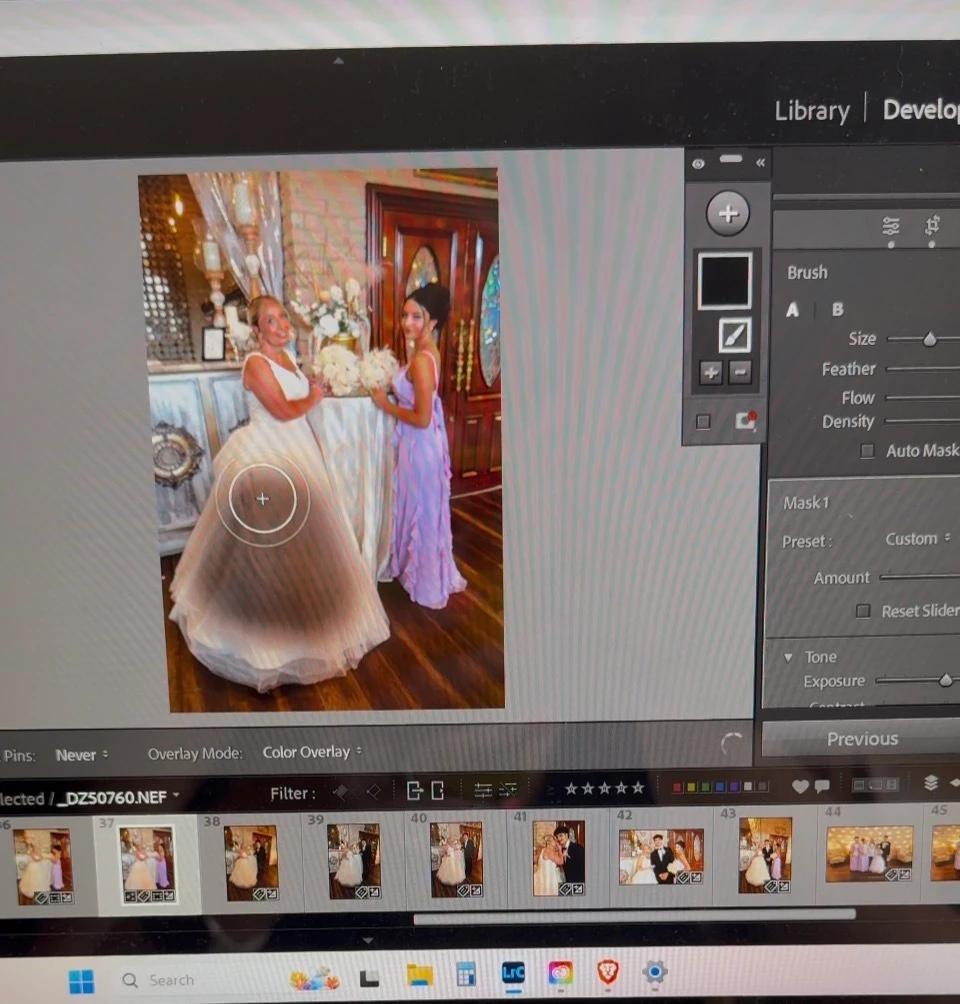
lightroom classic mask puts black on the mask and leaves a muted black overlay on the photo
  • July 22, 2026
  • 1 reply
  • 13 views

I was editing wedding photos without issue, when suddenly I get this black overlay show up when I did a mask instead of red.   I thought maybe I pressed something that caused the default red to change so I went ahead and did my edits, but then the photo remained with a black muted color on top of it.  I tried choosing a different color overlay color, but with the same result.  HELP PLEASE!! I need to deliver these photos to my client.  Thank you!  

    1 reply

    dj_paige
    Legend
    July 22, 2026

    What happens if you use the History Panel to move back a couple of steps? What step in history causes this blackish area to appear? Can you show us the steps in the History panel and indicate which step is before the black appears and which is when the black appears.

    Also, don’t use your cell phone to capture screens. In Windows you can use Windows Key-Shift-S to create a screen capture. (I’m sure you can do similar on a Mac but I don’t know how, you can search for it yourself). Please show us the ENTIRE screen, not a selected part of the screen.