

Inspiring
October 2, 2024
Answered

Lightroom Classic Memory and Performance

  • October 2, 2024
  • 3 replies
  • 1130 views

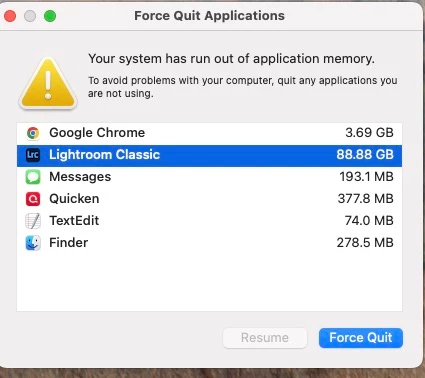
One picture is worth a thousand words. Using LRC 13.5.1 on Mac Mini M1 Sequoia 15.0. This usually happens after LR sits for awhile without being used:

Correct answer Timfl

Thank you, that makes me feel better in a weird way. 


3 replies

PECourtejoie
Community Expert
Community Expert
December 13, 2024

Hi, there is a new version of Lightroom out, did you try if it fixes this issue? one of the fixes pertained to sync...

TimflAuthor
Inspiring
February 24, 2025

Yes it did. Sorry for the late reply, I was out of commiccion for a couple of months

Ian Lyons
Community Expert
Community Expert
October 3, 2024

If you have sync to the Adobe Cloud enabled, you could try 'Pausing' it to see if it helps.

TimflAuthor
Inspiring
October 3, 2024

This is crazy!

JohanElzenga
Community Expert
Community Expert
October 3, 2024

Lightroom Classic 13.5.1 is not supported on MacOS Sequoia, so unexpected things can happen I'm afraid. So as long as there is no update that is supported, close down Lightroom Classic if you are not using it. For me, this is the reason why I never upgrade MacOS until a few months after its initial release.


-- Johan W. Elzenga
TimflAuthorCorrect answer
Inspiring
October 3, 2024

Thank you, that makes me feel better in a weird way.