
64784228
Inspiring
August 16, 2023
Question

Lightroom Classic not showing Collections

  • August 16, 2023
  • 1 reply
  • 162 views

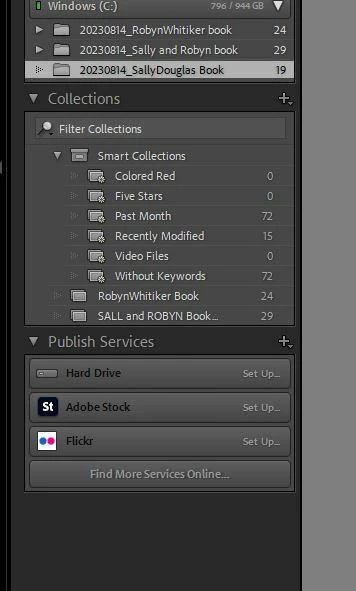
In my Collections panel I am missing Collections that were created yesterday. Sally Doughlas Book collection shows in the Windows (C) panel but not in the collections panel. So net result i have no access to images in that collection. Assistance please anyon.


collection collection Image attached
This topic has been closed for replies.

1 reply

Rob_Cullen
Community Expert
Community Expert
August 16, 2023

From your screen-clip:   {20230814_Sally Doughlas Book} is a FOLDER of your 19 files (as on your hard drive).

You also appear to have a Standard Collection of 29 images in a {SALL and ROBYN Book..} Collection.

Standard Collection of files are only useful when starting a new book (and I suggest ONLY when starting a NEW book!)


Now if you started a Book project by opening the Book module from any source of images (Folder or Standard Collection), you will not get a specific 'Book Collection' until you click on the Tab to [Create Saved Book] in the Book module.

Once a Saved Book Collection is created you must ALWAYS re-open to edit this particular book from the Saved Book Collection. (NOT a Folder of images, and NOT a Standard Collection of images.)


Regards. My System: Windows-11, Lightroom-Classic 15.4.1, Photoshop 27.8, ACR 18.4, Lightroom 9.4, Lr-iOS 10.4.0, Bridge 16.0.3 .
64784228
64784228Author
Inspiring
August 16, 2023

Thanks Rob

But I've done all that. I created a new collection named it and saved it as i allways do when using Lightroom. It just wouldnt show. So i just right clicked the collection from within the Windows panel and created a new collection and it worked. Not sure whats going on, but the collection was there yesterday as a collection.