



alexskunz
Inspiring
May 16, 2026
Question

Lightroom Classic on future macOS notification

  • May 16, 2026
  • 2 replies
  • 136 views

Hello,

I’m using a Mac with Apple Silicon (M2 Max) and have just gotten a macOS notification that Lightroom Classic will not run on the major macOS version (v27) since it is... an Intel-based app?!

However, in LRC’s system information dialog, I see “Application architecture: arm64” so now I’m confused. Is Lightroom Classic a native Apple Silicon app at this point, or not?
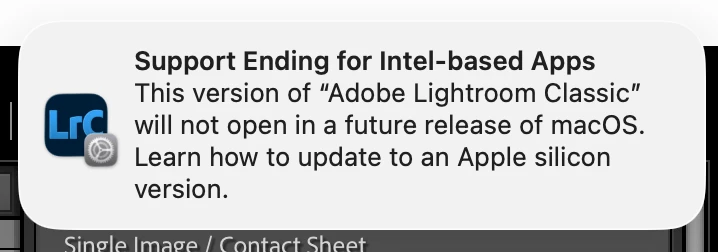
 

I have complete uninstalled and reinstalled the software a bunch of times over the years for troubleshooting so I would have expected that I’m using the correct version for my platform architecture.

Thanks for shedding any light on this.

Alex.

    2 replies

    johnrellis
    Legend
    May 17, 2026

    There appear to be multiple issues going on:


    - The Mac System Report's "Other" kind isn't useful -- it reports Adobe helper apps that contain just Universal binaries. I don’t know if it can include apps with Intel binaries.


    - The current releases of Photoshop and Acrobat each install one Intel-only binary. I'm sure these will be updated to Universal binaries before Mac OS 27 is released.


    - The other two Acrobat helper apps shown in Johan's screenshot may be present because Johan hasn't updated to the most recent Acrobat or, if he has, the Acrobat updater didn't remove those outdated files due to a bug or sloppiness. They are not part of the current Acrobat release.


    - The Creative Cloud app installs an Intel binary for the Adobe Sync functionality. The functionality may be dead (and thus the installation is a sloppy holdover), or Adobe may be providing the sync service to selected legacy enterprise customers (in which case they'll update them to Universal if that service is still being provided in Mac OS 27).


    Details:


    1. An uninstall/reinstall of Photoshop contains an Intel binary, and it's unknown whether it's still being used and needs to be updated to ARM or removed from the installation:


    /Applications/Adobe Photoshop 2026/Adobe Photoshop 2026.app/Contents/AdobeCrashReport.app


    2. The Creative Cloud app installs an Intel binary for the no-longer-available Adobe Sync functionality:


    /Applications/Utilities/Adobe Sync/CoreSync/Core Sync.app/Contents/Resources/Log Collector tool.app


    3. An uninstall/reinstall of Acrobat installs just one Intel binary:


    /Library/Application Support/Adobe/Acrobat DC Helper Frameworks/IMSLib/adobe_licensing_helper.app


    4. The other Acrobat Intel binaries observed by Johan are not present after I uninstalled and reinstalled:


    /Library/Application Support/Adobe/Acrobat DC Helper Frameworks/adobe_oobelib/adobe_licutil.app

    /Library/Application Support/Adobe/Acrobat DC Helper Frameworks/OOBE/adobe_licutil.app


    5. System Report shows some Adobe helper apps as "Other", while Finder reports them as "Universal" or doesn't report an application type, and the command "file" verifies they contain just Universal binaries:


    /Library/Application Support/Adobe/ARMDC/Application/Acrobat Update Helper.app

    /Library/Application Support/Adobe/Acrobat/DC/SupportFiles/Helpers/Adobe_Acrobat_Diagnostics.app

    /Library/Application Support/Adobe/Adobe Desktop Common/HDBox/AdobeCrashReporter.framework/Versions/A/Adobe Crash Handler.app


    johnrellis
    Legend
    May 16, 2026

    These warnings from Mac OS can be very confusing and some are surely spurious. You can be sure that Adobe will release a competely Intel-free version for Apple Silicon long before Mac OS 27.

    JohanElzenga
    Community Expert
    Community Expert
    May 16, 2026

    It’s time Adobe gets its act together on this, because it’s not MacOS that is to blame. Adobe is, because it still uses Intel-only stuff like this screenshot shows. 


    -- Johan W. Elzenga
    Community Expert
    May 16, 2026

    I don’t have these on my machine. I have zero non Apple Silicon Adobe applications. This is a full creative cloud install. It appears they are on yours because you might have an old Acrobat version installed. Acrobat DC is deprecated as far as I know.