
Lightroom Classic Plan Downgrade?
Hey, All,
So I have a concern. When I first started using Ligthroom in earnest I signed up for the Photography plan that came with Lightroom CC, Lightroom Classic, Photoshop, 1TB storage, etc for $19.99. Initially I exclusively used Lighroom CC, and imported my images using that, but as time went by I realized Lightroom Classic was a much better tool for my photography.
After much time using LRC, the storage I was using of my 1TB wasn't really increasing while my catalog grew substantially. I had been importing my images using LRC once I switched to it from LRCC. I found out that you only store the full size image files in the cloud if you import your images into LR using LRCC, and if you import your images into LR using LRC only previews are sent to the cloud and those previews do not take storage space in your alloted 1TB of cloud storage. Because of this I decided to downgrade my storage capcity to the 20GB photo plan.
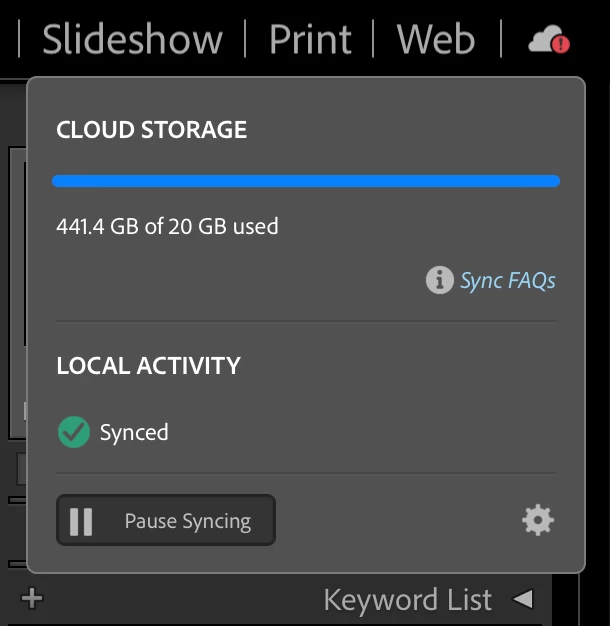
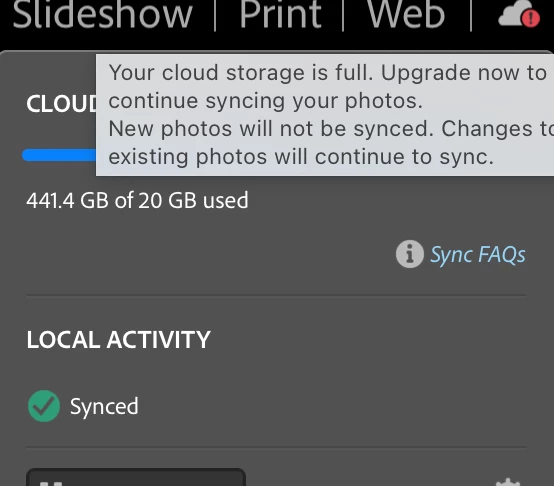
Now in LRC I get the following error messsage in the cloud storage area. How can I fix this? Thanks advance.
Allan


 AdChoices