


uberhop
Participant
Nov 30, 2019 8:27 PM UTC
Question

Lightroom Classic Printer ICC profile disappearing

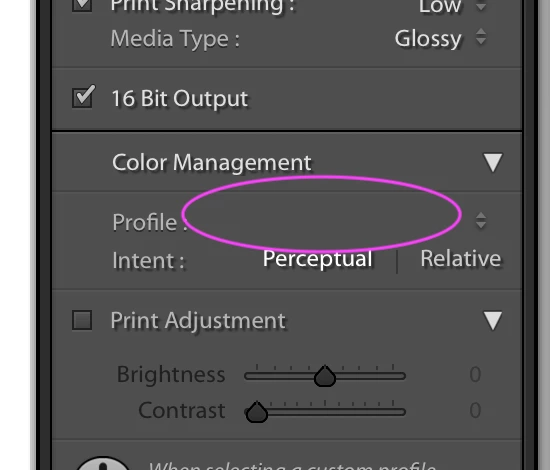
Hello, The past few months the Profile setting in the Color Management section under the Print Module has been disappearing/resetting on me. I've been using LR for years, printing with user presets in the Print module, and assigning either a papers ICC profile or choosing "managed by printer". I update my user templates with these settings so that when I print I don't have to choose the Profile every time. The problem now is when I choose a user template OR update a user template the Profile setting resets to nothing. The pull-down menu shows "managed by print" or the various ICC profiles available, but no selection is made. This causes the printer to manage color rather than LR. This problem started a few months ago in Mojave with my Epson printer. It's still happening in Catalina with my new Canon printer. I'm on the most recent LR Classic, Catalina, Canon printer driver, etc.


Right now the only way to have LR manage color is to manually select the paper profile every time a make a print. It is the only setting that is not sticky. I've been printing with LR since version 1, using the same procedure to have LR manage color, saving that setting to a preset and using those presets to make repeatable prints.... This bug totally new to me.
 

This topic is closed to new replies. Start a new post to keep the conversation going.

9 replies

Participant
Jan 18, 2020 9:29 PM UTC

So glad I'm not losing my mind and someone else having this problem. I've done all the resets etc ... but the thought of recreating catalog is not attractive ... compared with having to remember to select profile every time I print.

It's clearly a bug Adobe - how about fixing it?

Translate
Participating Frequently
Sep 23, 2020 4:38 PM UTC

I've just got a new iMac running Catalina. My catalogue is on an external SSD. I installed LR Classic 9.2.1 from Creative Cloud, copied over everything from my Library/Application Support/Adobe/Lightroom folder to the new machine and installed the driver for my Epson 4800 printer. Everything works fine except for this same issue. I opened the catalogue a few times before installing the Printer driver so the Profiles would have been missing and perhaps that might have something to do with it.


However, I don't understand why the Template settings are no longer sticky either when creating a new template or updating an existing one. Like uberhop I have to manually select the paper profile every time a make a print.


The solution of deleting all the prestes in Finder then recreating them doesn't really appeal to me! Anyone else found a fix?


Translate
JP Hess
Inspiring
Nov 30, 2019 8:43 PM UTC

Have you tried creating some printing presets? You can create them for different paper sizes and paper types, etc. Of course, you probably already know that.

Translate
uberhop
uberhopAuthor
Participant
Nov 30, 2019 8:45 PM UTC

Yes, My problem is that the presets aren't working.


I've just created a new "test" catalog and the problem doesn't' exist there. So it appears the issue is specific to my catalog. Now I have to figure out how to make a new version of my catalog. hmmm.

Translate
uberhop
uberhopAuthor
Participant
Nov 30, 2019 9:08 PM UTC

Ok, On a new EMPTY catalog the presets work fine. As soon as I imported some jpegs into the catalog the settings for the profile are misbehaving in the same way.


I did a "export to catalog" with my whole catalog and the problem continues in the new catalog.

Translate
Community Expert
Nov 30, 2019 8:30 PM UTC

You might try resetting your preferences. It sometimes corrects issues such as this: https://helpx.adobe.com/lightroom-classic/help/setting-preferences-lightroom.html

Translate
uberhop
uberhopAuthor
Participant
Nov 30, 2019 8:37 PM UTC

I've just tried it, thanks, but did not fix the issue.

Translate