matthewr58565327
Participant
January 29, 2020
Answered

Lightroom Classic processed images not displaying correct dimensions in Photoshop

  • January 29, 2020
  • 3 replies
  • 1066 views

Hi


Recently I found that Nikon Raw files processed through Lightroom Classic don't display the correct size when opened in Photoshop. Under image size in PS the dimensions are correct but the width and height are much smaller than I would expect. This is a recent change because if I look back a few months files from the same cameras processed in the same way they display the correct measurements when opened in PS.


Any help would be gratefully received.


Matt.
This topic has been closed for replies.
Correct answer Per Berntsen

This is easily fixed in the Image size dialog in Photoshop.

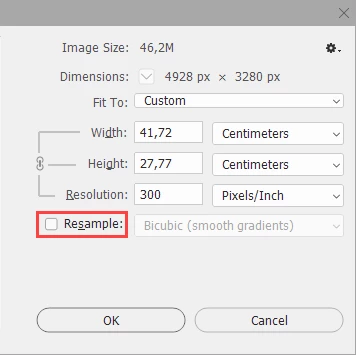
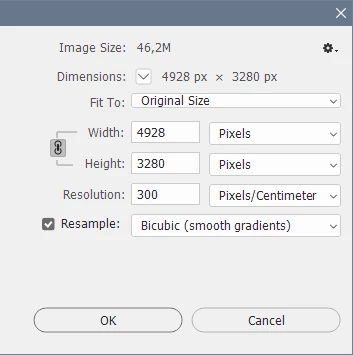
Your image probably opens like this:


Uncheck Resample, and change Pixels/Centimeter to Pixels/Inch. 

This will change 300 to 762, change it back to 300, and you're done. Click OK.


3 replies

Per Berntsen
Community Expert
Per BerntsenCommunity ExpertCorrect answer
Community Expert
January 29, 2020

This is easily fixed in the Image size dialog in Photoshop.

Your image probably opens like this:


Uncheck Resample, and change Pixels/Centimeter to Pixels/Inch. 

This will change 300 to 762, change it back to 300, and you're done. Click OK.


matthewr58565327
Participant
January 29, 2020

Per


Thank you thankyou.


The subtle difference between resolution at pixels/cm and pixels/inch. I obviously glanced at it but didn't take it in. My client and I are in your debt.


Matt.

Per Berntsen
Community Expert
Community Expert
January 29, 2020

You are using pixels per cm instead of pixels per inch, which will give you much smaller print size.


4928 x 3280 pixel image at 300 ppi will print at 41.72 x 27.77 cm.

A 4928 x 3280 pixel image at 300 ppcm will print at 16.43 x10.93 cm. (300 ppcm = 762 ppi)


Pixels per cm is not widely used, I suggest that you stick to pixels per inch.


matthewr58565327
Participant
January 29, 2020

Per


I understand what you're saying but the comparison I'm making is like for like and is an unexplained change over time. The difference will still be significant even if I change to inches. It's just the change that has me baffled and I'd like to try and understand what has happened.


Matt.

Per Berntsen
Community Expert
Community Expert
January 29, 2020

The pixel dimensions do not change when you send a raw file to Photoshop. 

Printed dimensions will depend on the ppi value (resolution) you have set up in Lightroom for external editing.

Edit > Preferences > External editing.


Digital images don't have physical dimensions, so the ppi value is used for calculating the printed size.

Ppi stands for "pixels per inch", and literally means how many image pixels will be used to print one inch.

For instance, an image measuring 2400 x 3000 pixels will print at 8 x 10 inches when the ppi is set to 300.

2400/300 = 8

3000/300 = 10 


matthewr58565327
Participant
January 29, 2020

Per


Thank you for your prompt repsonse. I probably wasn't as clear as I could have been. My work flow is that I process the files in LR and for most of the time that's it. The issue has been highlighted after I've exported and finished in LR. If I then open the file in PS from Windows Explorer that is when I see the odd image size info. What concerns me most is that there has been dramatic change in what PS displays from only 2 months ago. For example


Today a Nikon D4 image processed through LR shows dimensions of 4928px x 3280px and a width of 16.43cm x height 10.93cm at 300 pixels/cm


The same image processed back in July shows the same dimensions but a width of 40.23cm x height 26.78cm at 300 pixels/cm


I also found that when I processed the image through the cloud based LR the image showed the size I would expect.


I don't know if this helps at all but if in PS I click the 100% button both the ne wand old image display at exactly the same size.

I hope that it's just a software glitch somewhere along the line.


Many thanks


Matt.


dj_paige
Legend
January 29, 2020

"Today a Nikon D4 image processed through LR shows dimensions of 4928px x 3280px and a width of 16.43cm x height 10.93cm at 300 pixels/cm


The same image processed back in July shows the same dimensions but a width of 40.23cm x height 26.78cm at 300 pixels/cm"


Totally meaningless, and not an indication of any problem. As long as the pixel dimensions are the same (which they should be), your image is unchanged from Lightroom to Photoshop.