
Participating Frequently
October 12, 2023
Answered

Lightroom Classic reagiert nicht

  • October 12, 2023
  • 4 replies
  • 421 views
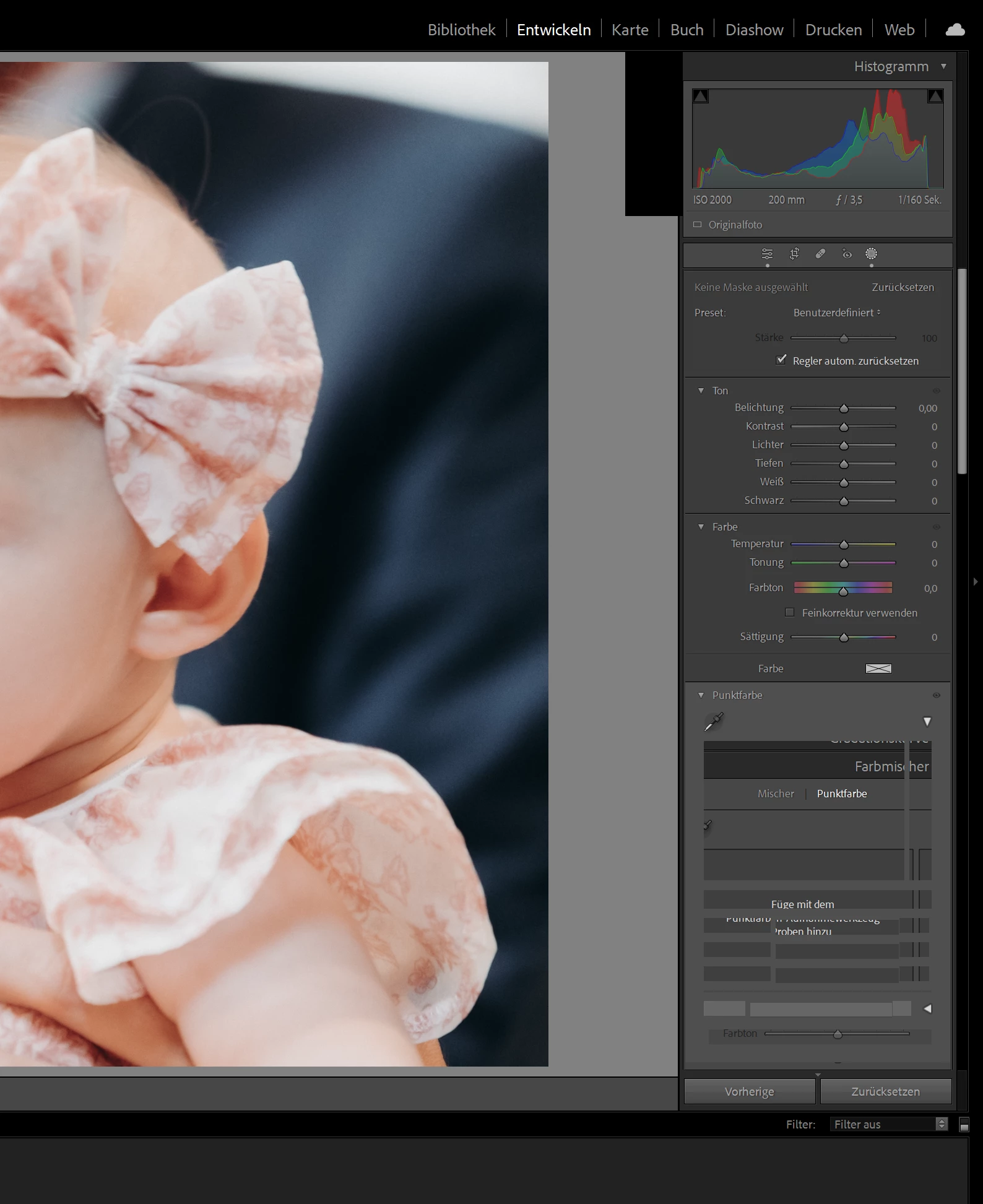
Hallo ich habe seit heute aus irgendeinen Grund das Problem, dass Lightroom, sobald ich in die Maskierung reingehe und z.B. Hintergrund auswählen will, sich das Programm aufhängt und nicht mehr antwortet. Die anderen funktionen gehen soweit.
 
Ich habeauch einen neuen Katalog gestartet und den alten gelöscht. 


Lightroom Classic-Version: 13.0 [ 202309270914-5a1c6485 ]
Lizenz: Creative Cloud
Spracheinstellung: de
Betriebssystem: Windows 11 - Home Premium Edition
Version: 11.0.22621
Anwendungsarchitektur: x64
Systemarchitektur: x64
Anzahl logischer Prozessoren: 12
Prozessorgeschwindigkeit: 2,5GHz
SQLite-Version: 3.36.0
CPU-Auslastung: 3,0%
Integrierter Speicher: 16233,6 MB
Dedizierter GPU-Speicher, der von Lightroom verwendet wird: 2918,6MB / 5979,0MB (48%)
Für Lightroom verfügbarer phys. Speicher: 16233,6 MB
Von Lightroom verwendeter phys. Speicher: 2085,1 MB (12,8%)
Von Lightroom verwendeter virtueller Speicher: 5497,4 MB
Anzahl GDI-Objekte: 772
Anzahl BENUTZER-Objekte: 2865
Anzahl Prozess-Handles: 2365
Cache-Speichergröße: 5,5MB
Interne Camera Raw-Version: 16.0 [ 1677 ]
Maximale Anzahl Threads, die Camera Raw verwendet: 5
Camera Raw SIMD-Optimierung: SSE2,AVX,AVX2
Virtueller Speicher in Camera Raw: 637MB / 8116MB (7%)
Physischer Speicher in Camera Raw: 641MB / 16233MB (3%)
DPI-Einstellung des Systems: 144 DPI (High-DPI-Modus)
Desktop-Komposition aktiviert: Ja
Standardvorschaugröße: 3840 Pixel
Monitore/Anzeigegeräte: 1) 3840x2160
Eingabetypen: Multitouch: Nein, integrierte Toucheingabe: Nein, integrierter Stift: Nein, externe Toucheingabe: Nein, externer Stift: Nein, Tastatur: Nein
 
Informationen zum Grafikprozessor: 
DirectX: NVIDIA GeForce GTX 1660 Ti (31.0.15.3758)
Anfangsstatus: GPU wird standardmäßig für die Bildverarbeitung unterstützt
Benutzerpräferenz: GPU zum Exportieren aktiviert


This topic has been closed for replies.
Correct answer GoldingD

Using your mouse, Click and drag on the left margin of that right side panel, drag it to the left as to enlarge (widen) it, perhaps past that point where that black rectangle near the top is peeking out from behind the panel (perhaps the mask selector box)


Some NVIDIA GPU users have had some issue that way.


see: https://community.adobe.com/t5/lightroom-classic-bugs/p-windows-application-hangs-when-trying-to-open-masking-tool/idc-p/14149252#M47184


4 replies

GoldingD
Legend
October 12, 2023

Now that LrC is currently behaving (sort of) You might want to try out moving where the mask selection panel is docked, and try out different windows screens (maximize, not maximize) to see if it behaves, and if you can then contract the right panel down to what you want.


Participating Frequently
October 12, 2023

Das problem liegt definitiv an dem Lightroom Update, ich habe zurückgestuft auf Lightroom 12.5 und alles funktioniert wie gewohnt!

GoldingD
GoldingDCorrect answer
Legend
October 12, 2023

Using your mouse, Click and drag on the left margin of that right side panel, drag it to the left as to enlarge (widen) it, perhaps past that point where that black rectangle near the top is peeking out from behind the panel (perhaps the mask selector box)


Some NVIDIA GPU users have had some issue that way.


see: https://community.adobe.com/t5/lightroom-classic-bugs/p-windows-application-hangs-when-trying-to-open-masking-tool/idc-p/14149252#M47184


kglad
Community Expert
Community Expert
October 12, 2023

@GoldingD 


instead of "legend" under your name here do you see "laying"

kglad
Community Expert
Community Expert
October 12, 2023

in the future, to find the best place to post your message, use the list here, https://community.adobe.com/

p.s. i don't think the adobe website, and forums in particular, are easy to navigate, so don't spend a lot of time searching that forum list. do your best and we'll move the post (like this one has already been moved) if it helps you get responses.


<"moved from cc desktop bugs">
