
Lightroom Classic running away with memory on Mac
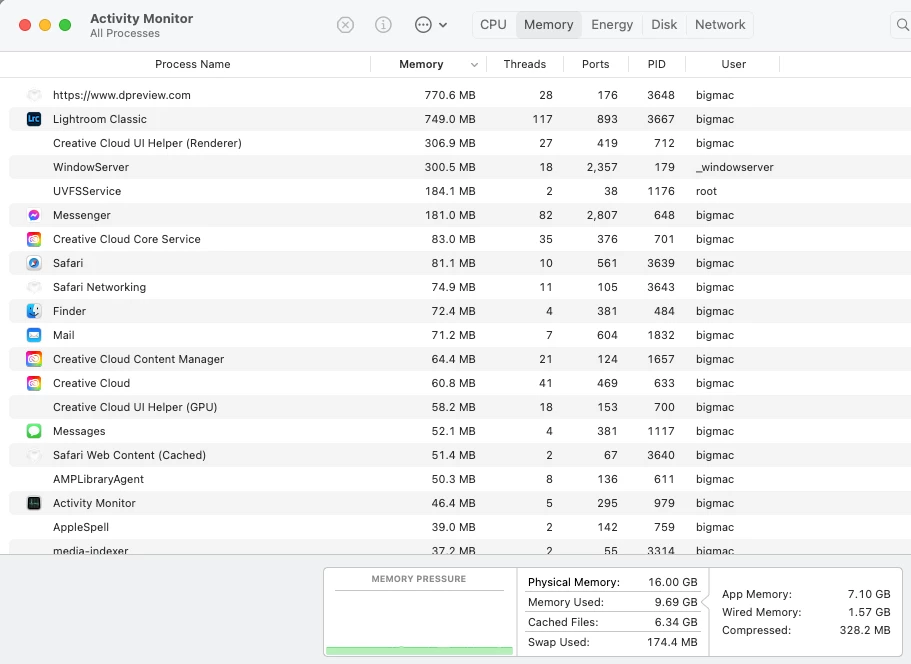
I have LR classic installed on an M1 Mac Mini with 16GB RAM. I hadn't used it for a couple of weeks and started again this week after getting a new camera body and lens. I saw that LR had been updated to 13.5.
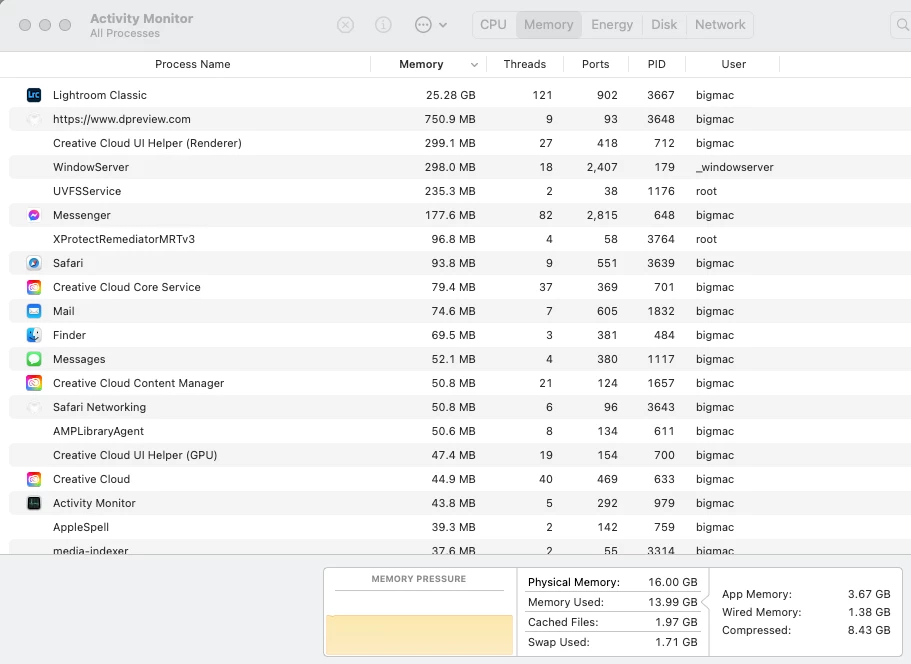
I was using LR on Friday night and left it open overnight - not unusual for me. Next morning my Mac was unresponsive and the Force Close window was open with the message that my Mac was out of application memory. I had to force quit LR to get round the issue.
I used LR again to import 21 new files and did some basic editing (change the camera profile on all files with copy/paste). LR was then using 32GB of memory. In fact this happens if I just open LR and leave it without doing anything.
CPU usage varied between 50% and 130% with about 115 threads, so I suspect something is running in the background that is hogging resources.
Here's what I see this morning. This is on startup.
This is after 5 mins with no action on my part.
Has anyone else noticed this or has any suggestions as to how to address it?


 AdChoices