


Known Participant
August 9, 2025
Answered

Lightroom Classic • Sort by folder

  • August 9, 2025
  • 3 replies
  • 164 views

When in Library view, after filtering images, e.g., by a particular keyword, I need to sort the results by the name of the folder that each image is in. However, sort by folder name is not available in the pull-down menu.

Correct answer johnrellis

[This post contains formatting and embedded images that don't appear in email. View the post in your Web browser.]


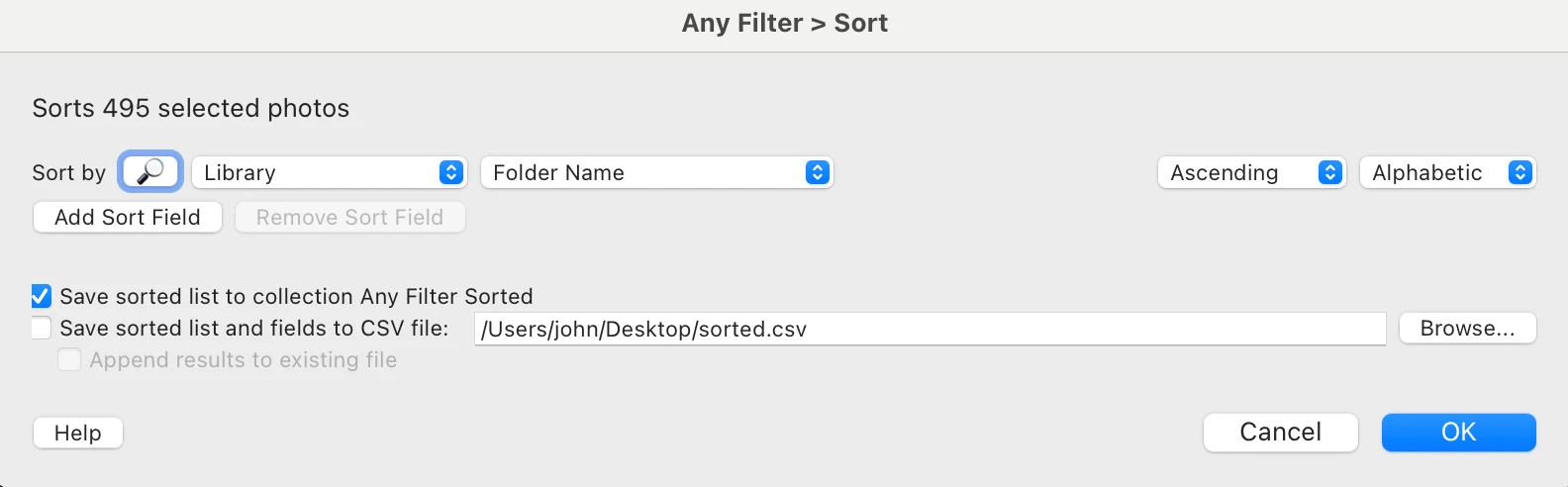
See the Any Filter plugin's Sort command:


3 replies

johnrellis
johnrellisCorrect answer
Legend
August 11, 2025

[This post contains formatting and embedded images that don't appear in email. View the post in your Web browser.]


See the Any Filter plugin's Sort command:


Rob_Cullen
Community Expert
Community Expert
August 10, 2025

A Plugin like 'Listview' may help you achieve what you ask.

https://photographers-toolbox.com/products/jbeardsworth/listview/

Listview can create a Collection-


Regards. My System: Windows-11, Lightroom-Classic 15.1.1, Photoshop 27.3.1, ACR 18.1.1, Lightroom 9.0, Lr-iOS 10.4.0, Bridge 16.0.2 .
kglad
Community Expert
Community Expert
August 10, 2025

in the future, to find the best place to post your message, use the list here, https://community.adobe.com/

p.s. i don't think the adobe website, and forums in particular, are easy to navigate, so don't spend a lot of time searching that forum list. do your best and we'll move the post (like this one has already been moved) if it helps you get responses.


<"moved from cc desktop ideas">