Question
Lightroom Classic: Strange "VM" Volume in import dialog box
Just upgraded to the latest Lightroom Classic CC (7.1 Release).
Noticed following in import dialog box:
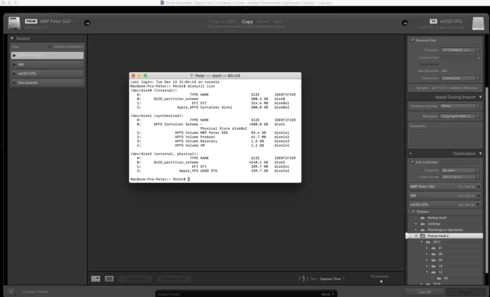
Both in the (lefthand) Source column as in the (righthand) Destination column, one of the listed Volumes is "VM" (refer to attached screen shot).
This "VM" Volume is not listed in any Finder window, so I ran DiskUtil to find out what it was. The "VM" Volume appears to be a low level volume on the internal SSD, just like the "Preboot" and "Recovery" volumes (only those two are correctly not listed in the LR Classic CC import dialog box).
My impression is that it's a bug, and that this "VM" volume should be suppressed in the dialog box (shouldn't even be present at this level of the OS).
Any ideas?
Apple MBP (2017 | 15" Retina | 2.9 GHZ Intel i7 | 16GB | 512GB SSD | MacOS High Sierra 10.13.2)
Noticed following in import dialog box:
Both in the (lefthand) Source column as in the (righthand) Destination column, one of the listed Volumes is "VM" (refer to attached screen shot).
This "VM" Volume is not listed in any Finder window, so I ran DiskUtil to find out what it was. The "VM" Volume appears to be a low level volume on the internal SSD, just like the "Preboot" and "Recovery" volumes (only those two are correctly not listed in the LR Classic CC import dialog box).
My impression is that it's a bug, and that this "VM" volume should be suppressed in the dialog box (shouldn't even be present at this level of the OS).
Any ideas?
Apple MBP (2017 | 15" Retina | 2.9 GHZ Intel i7 | 16GB | 512GB SSD | MacOS High Sierra 10.13.2)
 AdChoices